tightvnc doesnt seem to work with MAC osx.
Hi Nicholas,
we tried to integrate RealVNC several times but it doesn’t “play nice” and cannot be embedded like other clients.
You can make TightVNC work with macOS when enabling Screen Sharing with VNC clients permitted:
https://support.apple.com/guide/mac-help/turn-screen-sharing-on-or-off-mh11848/mac
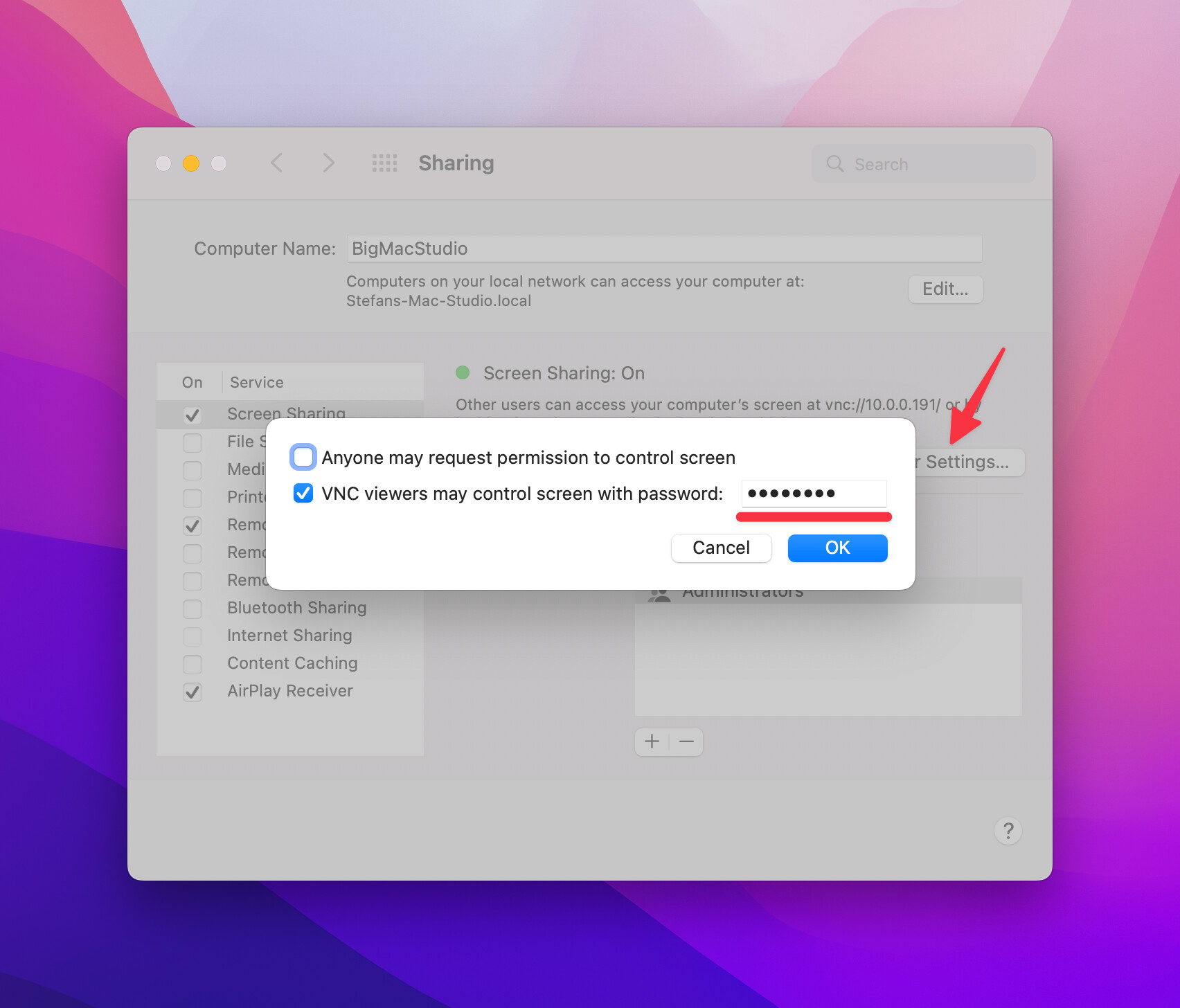
Once macOS is configured you have to specify the password without the user name.
Let me know if this helps.
Regards,
Stefan
I have that setting configured. Tight VNC doesn’t work. Keep getting an error about DES encryption.
That’s strange. I’m not able to reproduce the error on my test systems.
What version of Royal TS are you running?
Can you switch to the other TightVNC plugin which is using the locally installed client?
Regards,
Stefan
Hello,
I have the same error, when trying to connect to a Mac using the integrated TightVNC plugin:
Message:
Specified key is a known weak key for ‘DES’ and cannot be used.
I talked to the support a couple of weeks ago and only using the external TightVNC Plugin solved my problem.
I am on Royal TS 6.1.10324 - Beta (the official release did not work either)
I tried with the non-integrated tightvnc and seems to work.
Thanks for confirming, Nicholas!
Would you be able to switch back to the integrated plugin, enable Debug or Verbose logging in the Options, freshly start Royal TS, initiate the VNC connection (which fails) and send us the log (via support ticket)?
This way we can forward the communication log to Glavsoft (company writing TightVNC) to investigate.
Thanks,
Stefan
yup, opening support ticket now.
Thanks! I forwarded your logs to the vendor.
Hello Stefan,
any updates on the DES-error?
Regards,
Robert
We did get some more information from the vendor but there’s still no fix for it on the horizon. In previous .NET versions, the vendor put in an override for the DES weakness check which is built into .NET. Since we switched to .NET 5/6 (previously known as .NET Core) the code in the framework changed and cannot be overwritten as easy as before.
It does seem to be related to the configured password though. If you change the password to a stronger one, it should work. Can you try that and let us know if that’s the case?
I tried to change to a stronger password, but on Mac it is limited to 8 caracters, so unfortunatly no success with that.
That’s weird because the passwords (with 8 chars) we use, work fine in our tests. Can you try a couple 8 char passwords with letters, numbers, symbols and try if that helps. If it doesn’t, can you share one of the combinations you tried so that we can verify this on our end? Please don’t share any of your “real” passwords 
It just dawned on me that I haven’t seen any screenshot/configuration from your VNC credential in Royal TS. Did you actually specify the password in the connection’s credential page (in the password field while leaving the user name field blank)?
These are the generated Test-Passwords which for example won’t work:
2uy?$Ib0
0bLbTM%-
r4wFcAO&
Ahhh I did not see your last answer. With this it works!!
I did not know that I have to set credentials and I waited for a window to ask me for it.
Thank you very much!
I see. Mystery solved. Glad you got it working!
Ok, so, setting the credentials works. Its time to do something at Royal, to ask for credentials, or the error to be “set credentials” that would save 30 minutes of googling to fin this hidden post and read all replies… 
Hi Mariano! I’m sorry that this is so confusing. We can’t really change that behavior because it’s part of the VNC specs/implementation. The error messages we get from the VNC server are sometimes not really helpful.
I imagined that something like that was happening that was not “fixed” already. (and with fixed I mean just dropping the correct error) Maybe add the error to a troubleshooting guide somewhere? Maybe when connecting to vnc ask for credentials by default? and a checkbox to “do not ask” if still someone out there that leaves a vnc server without a password… Is not difficult to reproduce, just install TightVNC server on any windows 10 or 2019+ server and try to connect to it without setting credentials
Thanks for the reply!