We have a jump host scenario, where we admin our server through a secure gateway (on the jump hosts). The opening of the proxmox interface only works, when we add the google domains in the bypass section of the connection. (When using google chromium as plugin, with edge, we have to bypass the ms domains.)
Is it possible to add a web plugin which is NOT calling home when using it?
Hi Stephan,
Both web plugins use embedded browser engines—Chromium from Essential Objects and Microsoft Edge WebView2—which may make background requests independently of the page being opened. Some individual services can be disabled, but neither engine provides a documented configuration that guarantees no background connections to Google or Microsoft.
Adding those domains to the proxy bypass list routes their requests outside the Secure Gateway; it doesn’t stop the requests.
We’d like to investigate why these requests prevent the Proxmox interface from loading. Could you share your Royal TS version, the exact domains you added to the bypass list, and any error shown when opening the connection without those exclusions? This would help us narrow down the cause.
Hello
I talked about this problem with Christoph M. (royalapps) before.
Versions we used:
Client: Latest Royal TS, (now latest Royal TS Beta)
Server: Royal Server 5.4.50909.0
Bypassed Domains:
accounts.google.com;clients2.google.com;content-autofill.googleapis.com;www.google.com
URL: https://servername:8006
Using Royal Server & Secure Gateway
Error without Bypassed Domains: “An operation timed out.”.
Log of Royal Server:
2026-10-02 10:06:44.402 [INF] [SECG] Local forwarding connection requested - Session: {“SessionId”:52,“SessionUsername”:“@.“,“RemoteHostName”:“accounts.google.com”,“RemotePort”:443}
2026-10-02 10:07:05.412 [INF] [SECG] Local forwarding connection requested - Session: {“SessionId”:52,“SessionUsername”:”@.“,“RemoteHostName”:“proxmoxip”,“RemotePort”:8006}
2026-10-02 10:07:05.414 [INF] [SECG] Local forwarding connection requested - Session: {“SessionId”:52,“SessionUsername”:”@.“,“RemoteHostName”:“proxmoxip”,“RemotePort”:8006}
2026-10-02 10:07:05.415 [INF] [SECG] Local forwarding connection requested - Session: {“SessionId”:52,“SessionUsername”:”@.“,“RemoteHostName”:“connectivitycheck.gstatic.com”,“RemotePort”:80}
2026-10-02 10:07:26.566 [INF] [SECG] Local forwarding connection requested - Session: {“SessionId”:52,“SessionUsername”:”@.“,“RemoteHostName”:“www.google.com”,“RemotePort”:443}
2026-10-02 10:07:47.572 [INF] [SECG] Local forwarding connection requested - Session: {“SessionId”:52,“SessionUsername”:”@.**”,“RemoteHostName”:“accounts.google.com”,“RemotePort”:443}
Tried to work with chromium start parameter as some mentions in the web, but not one brought the website on screen.
With MS-Edge, the engine tries to reach MS Domains, one is a skype domain…
From what I gather, it’s not possible to prevent this “chatter” in the web engines but it’s puzzling that the web view won’t work when these domains/sites are not reachable. I don’t see any log entries which indicate that the the proxmox page could not be loaded. Can you provide more details here or in private through a support ticket?
I’ll open a support ticket at monday.
But I don’t have much more information. I saw while I researched that problem, that this is a most common problem with google logins oder add-Ins on webpages.
But the same problem happens when opening a web connection to synology nas.
More at monday.
Thanks and have a nice weekend!
Wie versprochen wurde das Ticket eröffnet. 
Heyo,
I can agree with the fact.
While the Edge Addin works like a charm using it directly without “Secure Gateway”.
As soon as we use a Royal Server as a “Secure Gateway” reagardless of “Intranet” or “Internet” or if the Regular “Royal Server” is user or the newest Release “Royal Server Beta 15 - 26.0.15.0” it is the same issue.
Broken Connections - EXTREMELY SLOW PERFORMANCE - Issues over Issues.
(Also after an Update and Reboot of the Service - the User that is running the Royal Service often loses its Permissions and cannot start the according service - till you manually enter the Credentials again - which is a bit tiring with a tiering concept. - Also you have to set it via the “Service.msc” - In RoyalTS Server “Worker Account” does not seem to set this correctly.
And the recognition bewteen Domain Shortname eg. INTERN-NAME - does not recognize the long name as the Long Domain name eg. INTERN.LONG-NAME.COM as example)
So while waiting - 8 Minutes have gone by - the website has loaded so slow that the website is just fragmented data / css mess.
In the Log Data… nothing really appears just that a connection (443) is being tried to be established.
as Example:
```
Level Timestamp Category Message
INFO 05.10.2026 12:49:23 SECG Local forwarding connection requested - Session: {“SessionId”:1,“SessionUsername”:“INTERN-NAME\adminNAME”,“RemoteHostName”:“www.mailcontrol.com”,“RemotePort”:443}```
While also trying to go to:
Which where not requested.
Another Interessting Fact:
Wanted to switch to “Debugging” for the Logs - after doing that I cannot authenticate against the RoyalServer with my YubiKey anymore? I think the “Wait Time” is to tight then somehow?
If I manage to hit my yubikey under one second after the popup the login works…
Nope - even with Debugging Level Logging nothing new.
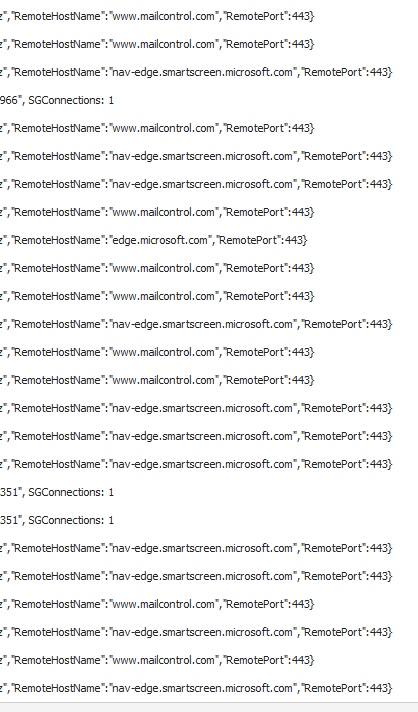
I just wanted to add it here for Visibility as there.. are multiple Issues.
Thank You!
Hi!
I just found this:
I haven’t checked the details yet but this sounds like the issue you are seeing, correct?
From that issue:
Knowing that, we were able to mitigate it. Rerouting login.live.com to something invalid in /etc/hosts helped, as did disabling the service in the first place.
Does this workaround help in your situation as well?
On it, just showed this my colleague of the Firewall Team - not happy.
We will try if this is part of the Issue.
THANK YOU.
Will Update.
Many wasted hours - right now in RoyalTS Beta there must be a Bug.
As soon as I use the Default Edge Browser Plugin. (Chrome Plugin Disabled)
Configure the Secure Gateway Server to the Used Royal Server Instance (Tiering) (Default Current Royal Server Version 5.4.50928.0)
It absolutely fails in multiple ways.
VERY SLOW also just used Internally.
So Slow Infact that an Appliance Logon simply Fails.
Not one dropped Package in the Firewall.
I a wasted so many hours of my and my colleagues time till we just removed the SecureGateway from the Websites and Enabled the URLs and Ports on the Server Locally to test.
BAM Everything works.
But this is not an solution as we only want to manage our stuff via the SecureGateway and Right now for Websites it is unusable in multiple ways.
ALSO:
Secure Gateway.
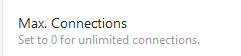

Okay?
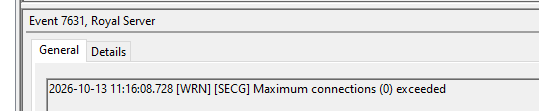
It leads to the Problem that every connection leads to an “Socket connection error”
But even if upping it to 99999 does not change anything in the current situation.
Hi Ben and Stephan,
Thank you for the detailed information and for your patience. Your reports and logs were very helpful, and we were able to reproduce the issue in our lab.
We traced the delays to the third-party SSH server component used by Secure Gateway: a connection attempt to an unreachable destination can hold up other requests in the same session, including those for the internal webpage.
We’ve reported our findings and reproduction details to the vendor, Rebex, and hope they can address this soon. We’ll keep you updated as we learn more.
The separate issue shown in your screenshots—where setting the maximum connections to 0 produced an incorrect limit warning—has also been fixed.
Thanks again for helping us get to the bottom of this!
A small update: our vendor Rebex acknowledged the bug and they are looking into it. As soon as we have an updated version, we will implement the fix.