SSH-Agent for SecureGateway

Hello together,

many colleagues asked me, if it’s possible to use an ssh-agent for secure-gateway authentification (e.g. Pageant). Now it look’s like that didn’t work..

Is it planned to implement a feature like this in further versions?

Greetings

Frank

Hi Frank,

there are no plans right now to include an ssh agent. Most of our users are storing the credentials in Royal TS documents. Can you provide some details why this is not an option for you or what the exact use case is?

Thank you,
Stefan

Hi Stefan,

on many jumpservers we have to use Pageant with an certificate located on a smartcard (2-factor authentification) to connect to them with SSH.

And this certificate we can’t store in RoyalTS to use the secure-gateway-feature.

Greetings

Frank

Hi Stefan, Hi Frank,

I found your discussion here and have to say we have the same problem now.
I would be nice when this feature will be implemented in the near future.

Kind regards
Dominik

Hi!

Having the same issue here. I had high hopes for the Secure Gateway feature! Alas, it’s of no use for me as the private key needed for jump host authentication resides on a smartcard that is only usable via pageant.

Cheers

Alex

Plus one for this also.

We store our ssh keys on Yubikeys, having no way to extract the private key, using gpg-agent or pageant for our ssh connections.

Hi everyone!

Rebex, who is providing the components for terminal (SSH) and file transfer, is currently working on Pageant support. I’m not sure what exactly is covered and how it is working but as soon as they have something, we will see if and how we can integrate this into our product. Stay tuned.

Regards,
Stefan

Plus one for this also.

+1

I recently decided to try out ssh-agent forwarding and I’m surprised that I have to run a third party ssh agent outside of Royal TS, and also switch from Rebex terminal to PuTTY as Rebex doesn’t support ssh-key agent forwarding.

Royal TS takes on control of my SSH keys as credential objects but does not allow a ssh connect to do agent forwarding with those same credentials.

I’d really like to see:

  1. Royal TS become an ssh-agent for credentials defined for a connection

  2. Rebex support ssh-agent forwarding

This will allow me to ssh into my jump host, and then ssh from there to my other servers without having to control and distribute my ssh-keys all over the place. I don’t actually mine running a third-party ssh-agent (I use Simon Tatham’s Pagent) if the Royal TS default Terminal plug-in supported forwarding.

+1 same usecase

+1 same usecase

ssh-connections can use Pageant by enabling it in “Terminal application settings > Advanced > SSH Settings > Auth : Attempt Authentication using Pageant” using PuTTY plugin.

Secure Gateway entries still can’t use a ssh-agent like Pageant.

The idea was already posted by Frank 6 years ago:

How is the progress on that?

Hi!

The Rebex based Terminal gained SSH-Agent support a while back:

Since the Secure Gateway is using the same underlying SSH implementation we could bring that to the Secure Gateway as well.

Note that SSH Agent Forwarding is still not supported right now. Would anyone here be interested to test this?

Hi Stefan,

that sound’s good :slight_smile:
Could I try this new feature?

Greetings

Frank

I’ve created an internal build for testing which allows you to configure the auth. agent for secure gateway:
https://download.royalapps.com/royalts/royaltsinstaller_7.02.50701.0_x64.msi?rnd=7568
https://download.royalapps.com/royalts/royaltsinstaller_7.02.50701.0_arm64.msi?rnd=7568
https://download.royalapps.com/royalts/royalts_7.02.50701.0_x64.zip?rnd=7568
https://download.royalapps.com/royalts/royalts_7.02.50701.0_arm64.zip?rnd=7568

Let me know if this works.

Thanks,
Stefan

yes, i just tested it, this seems to be working! Thx!

when can we expect this to be officially released?

Great to hear that. Maybe this or next week a new release will be published.

great news, thanks again

Thanks Stefan and your colleagues.

Secure gateway works now with Pageant.

I only have a little side effect:

If I connect via a secure gateway, it makes the tunnel to the destination.

This creates a random source port on the gateway, if I understand correctly.

After that it connects to the destination machine to the ssh port.

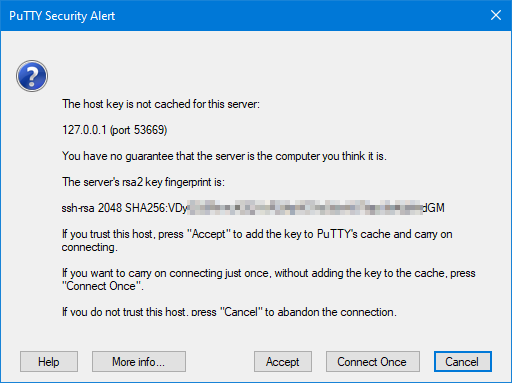
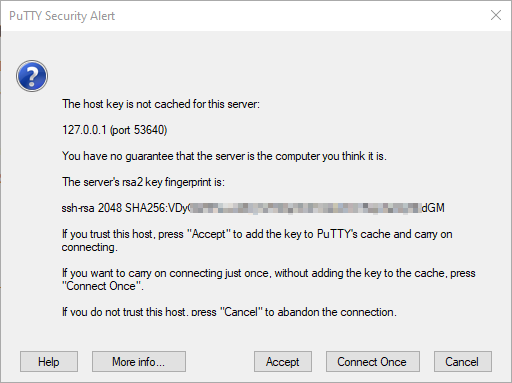
So, everytime I connect via secure gateway, I receive the message, that the host key is not cached.

I [Accept] the key from 127.0.0.1 (port <RANDOM>), which put the key to the cache, but after another logon it asks again.

How can this be prevented?

I think you should be able to prevent this dialog by putting storing Fingerprint and enable the Use Hostkey option in the PuTTY connection configuration:

https://docs.royalapps.com/r2023/royalts/reference/connections/terminal-putty.html#use-hostkey

Let me know if this helps.

Regards,
Stefan