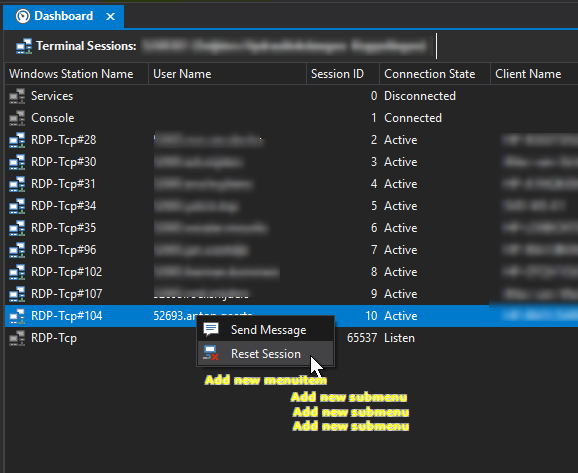
When monitoring a lot of terminal-servers based on Windows 2012r2 or 2016 RDS deployments, it would be really timesaving to be able to shadow active sessions shown in the Dashboard Tab by right-clicking the session to shadow.
It would be even nicer to have a dropdown submenu on the contextmenu-items
to select options like /Control and/or /noConsentPrompt.
Commandline in the background should than look someting like:
After 4 years, unfortunately still no progress, feedback or anything. Really hoping some news in the near future. I know this is filed as an idea, but guys please, some feedback if it will be created, considered etc., would be nice.
I’m sorry for not replying earlier. We missed this thread somehow and last weeks response triggered another notification.
I’ve looked into session shadowing and the main issue is that we are not using MSTSC in Royal TS. We are using the ActiveX control and according to the docs, there’s no API to initiate shadowing. As soon as Microsoft provides the APIs, we’re happy to integrate it into our dashboard.
Royal TS already has access to the computer name (RDP Server) and the Session ID. Why not just send a scripted call to C:\Windows\System32\mstsc.exe /v:%servername% /shadow:%sessionid% /control /noConsentPrompt.
It seems a popular demand of Royal Apps customers.
I guess we can implement something like that but it will then be started as external application and not embedded. I will put this on the TODO list and hope we can do this some time after V6 has been released.
I just implemented the command to the terminal services / remote desktop dashboard. This will be available in the next beta release, probably by the end of the week.
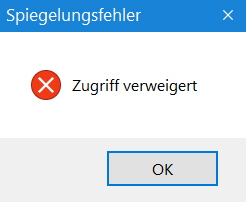
I have installed version 6 and checked the Shadow Session via Dashboard with high expectations. Unfortunately, this does not work yet and I get the following error message. What am I doing wrong? What have I overlooked?
I honestly can’t tell. Royal TS executes the command line as discussed in this topic. Can you check your task manager and compare the command line Royal TS executes with one successful you execute manually?
I guess the logged in Account has no access rights.
I have the same with non admin account.
Can the string be customized?
We would for example need “/prompt” to login with admin credentials and remove “/noConsentPrompt” as we require the consent of our users for remote session.
The next release will have a UI where you can enable/disable the /prompt and the /noConsentPrompt argument before you execute the shadow session command.
latest version is not working for view only (but control works) @stefan
you should not include /control because the main purpose of shadowing is to “view only” current rdp session, not “contrl” the current session(or at least let user choose a option)
example view only the current rdp session using bat:
set /P rcomp="vm PC: "

set /P rid="Enter RDP user ID: "

start mstsc /shadow:%rid% /v:%rcomp% /noConsentPrompt /prompt
I think you guys should add /control to shadow menu, by default without /control means “view only”
btw /Control should be by default ticked off when adding to shadow menu, make sense when you want to shadowing a session, usually you want them to view only mode, not controlling
If yo turn “Control” of by Default, could a setting for defaults be implemented so one can control the default behavior if one desire to use Control or the other switches differently as others.
We would for example always use the Control Option enabled
providing a default setting UI for this option is a bit more effort. May I kindly ask you to create a dedicated feature request for that in order to track demand for this particular feature?
I just finished my Powershell script for shadowing and now it is implemented in version 6 …
But one problem we have is the current user session the mstsc.exe is running in. All people from IT have normal windows domain users, no special rights on domain, computers, servers etc. For administrative work we are using individual admin accounts. In my script, I start mstsc with my admin account and can connect without the /prompt parameters. With the new shadowing option in RoyalTS, my current logged on user is used and I cannot connect. For sure it is possible with /prompt parameter but then I have to put in my admin credentials each time I connect to a computer. Would it be possible to start mstsc with the credentials configured in the RDP connection? Even better, use the configured credentials from the RDP connection.