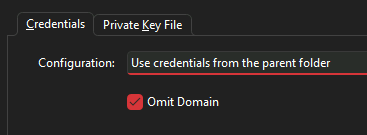
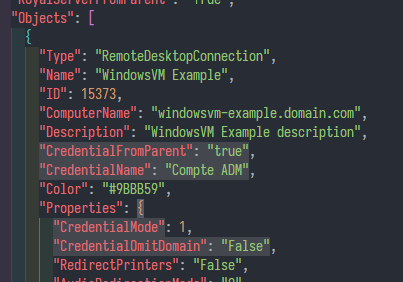
I’me not sure if I’ve had already opened a ticket for this one before, but as the issue is present in the latest RoyalTS v7 version, I think it is worth opening a thread for it.
I’ve a Dynamic Folder calling a PowerShell Core 7 script to generate a RoyalJSON output based on registred funtional CIs in an iTop CMDB.
It is configured with a bunch of folders to get a neat list and each top level folders are configured with “Using credential by name” and a value. Each sub-folders and connections are configured to “Use credential from the parent folder”. Credentials are created in separate users’ personal document with names matching what’s used in the script.
I’ve noticed that the credential is not correctly resolved when opening the connection as the user is prompted to enter it, not with the builtin credential picker, but the PuTTY login prompt or the Windows credential prompt for TSE. (I’ve not yet checked with WebPages as autofill does not play well with iDRAC login pages )
For now, I’ve modified my script to query the credential name from the parent folder and set it directly at the connection level. It works correctly this way, but the inheritance behavior we are used to with plain documents is not applied here
If needed, I can provide a sample RoyalJSON file to inspect
You can find a sample rJSON file here: itop_parsed.json
I’ve let 2 example connections so you can see how both types are configured (I use an object with all properties set and use it on each connection object).
Damn it
Such a dumb typo, one missing S and you scratch your head a long time
Maybe I should have added the $schema reference beforehand to check
Is there any URL we can use directly like docs.royalapps.com/rjson/schema or we need to copy/past what’s available from JSON Schema page?
You’re very welcome! What still puzzles me is that the UI was indicating that the cred from the parent should be used but the underlying model did not reflect that. Still looking into that one…
 )
)