RoyalTS v26 beta w/ RoyalTerminal : some issues

Hi everyone !

Saw the blog post around Terminal & File Transfert Connections work in progress and wanted to give it a try, mainly for the Ghostty implementation of RoyalTerminal :heart_eyes:.

I’ve found some issues with font rendering that is not as clean as PuTTY (or Windows Terminal):
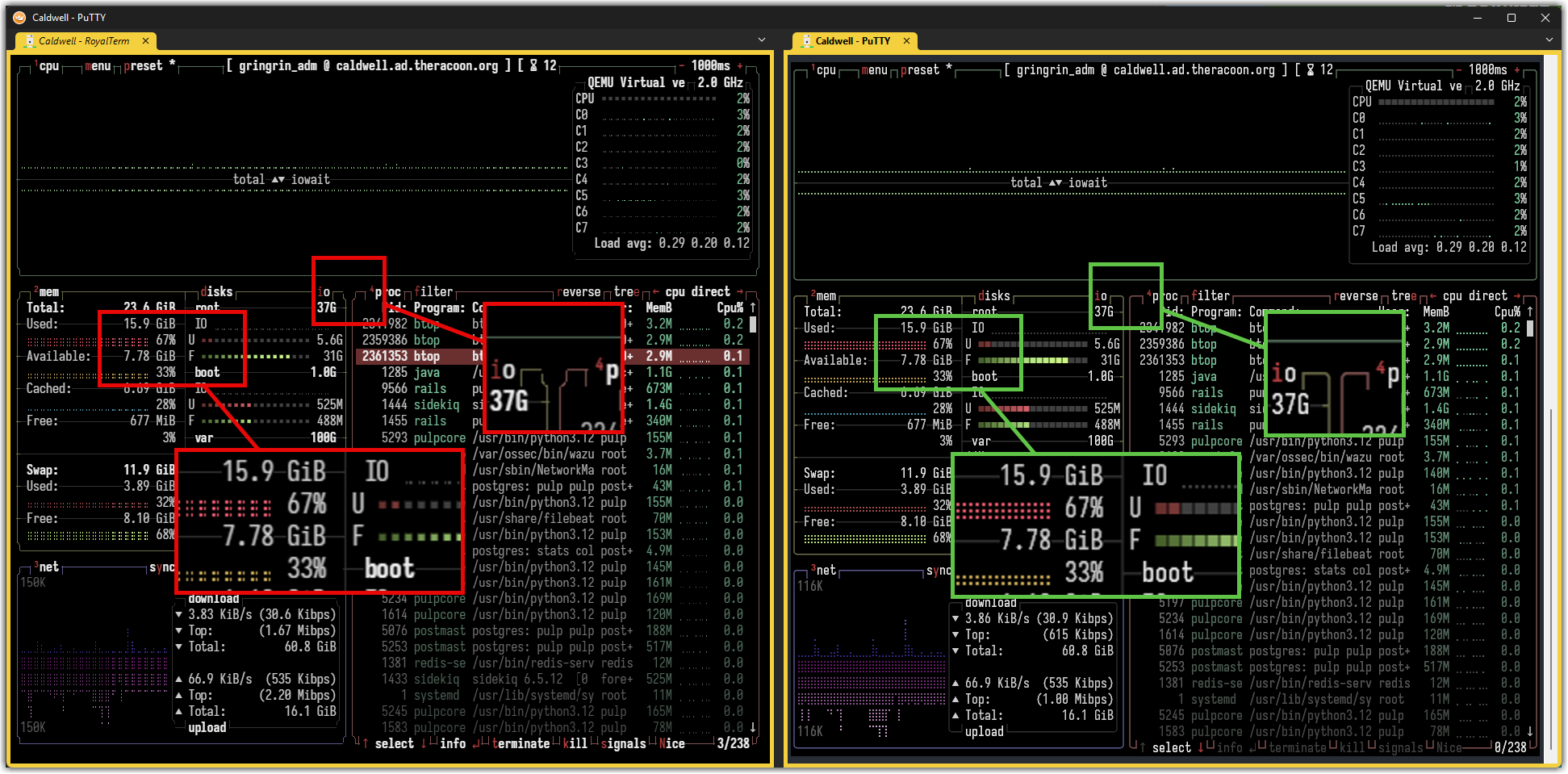
In the screenshot I’ve duplicated an existing PuTTY connection and changed it to use the new Rebex plugin option as shown in the blog post. No big modifications in the configuration, same font face, same font size, same color palette.

Some characters used for rounded lines seems weird and braille characters or squares seems shrinked or zoomed out :thinking:
The font used here is IosevkaTerm Nerd Font (Mono variant), also tried with FiraCode Nerd Font (Mono variant)

Some other shell TUI using lines drawing witth similar glitches (some less obvious):
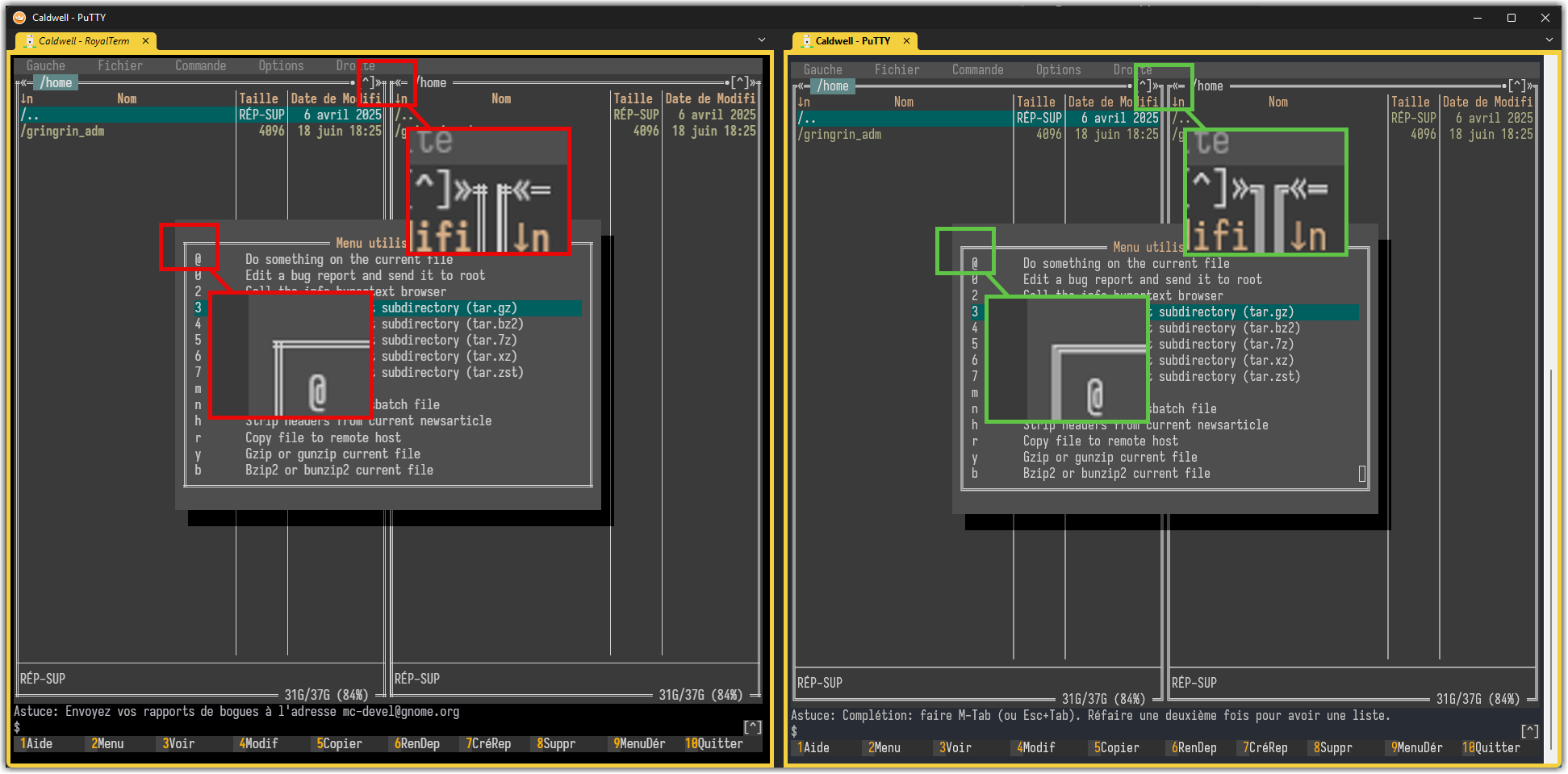
There is also some keyboard handling issued, for example the Tab key is inoperant so the shell completion did not work, MidnightCommander switching panels or navigating in dialogs did not work, same with ncurses TUIs (eg. nmtui).

If you want a sample document with the connections configuration as used here, let me know and I’ll provide one to test :wink:

I’ve not yet tested everything around this new plugin (kitty graphics support, links, File panel, …) but will look for it soon !

Anyway, big thank you to the RoyalApps team for all their hard work!

Best Regards,

Nicolas.

Hi Nicolas,

feels like a déjà vu :wink:

Glad you tested the beta build and Royal Terminal.

We fixed the fallback glyph and sprite rendering to better match what Ghostty/PuTTY/Terminal on Windows is doing.

Keyboard handling (TAB and F-Keys) should also work in the next release.

Thanks again for testing and providing such a great test report. Much appreciated!

cheers!
Stefan

Hi Stefan,

I’ve installed beta 15 to check RoyalTerminal.

First the graphical issue is solved and it’s way more readable, thanks !
The issue with the tab key (and F-keys) also seems corrected too, that helps a lot :wink:

Unfortunately, I’ve another keyboard issue now​:confounded_face: I’m using a french ISO keyboard and ALT-GR key sequences aren’t really working :

  • ALT-GR 2 => ~ : ok
  • ALT-GR 3 => # : prints ;7u
  • ALT-GR 4 => { : prints 3;7u
  • ALT-GR 5 => [ : prints 1;7u
  • ALT-GR 6 => | : prints 4;7u
  • ALT-GR 7 => ` : prints 6;7u
  • ALT-GR 8 => \ : do nothing
  • ALT-GR 9 => ^ : do nothing
  • ALT-GR 0 => @ : do nothing
  • ALT-GR ° => ] : do nothing
  • ALT-GR + => } : prints 5;7u
  • ALT-GR $ => ¤ : prints 4;7u
  • ALT-GR E => : do nothing

Also in another register, I’ve experienced some lockups where the whole RoyalTS interface is not responding to any click or key press at all.
Task manager didn’t show any real activity of the process (CPU, disk, net) and when I tried to end the task RoyalTS immediately saved documents and closed like if I’ve normaly closed the window.

When it happened, I was trying to test the kitty protocol with the viu utility (viu-x86_64-unknown-linux-musl) to show an image (a simple PNG file). It works on the first call but freeze on the second one, always (even if I’ve done some actions between both commands like opening a fullscreen TUI or something else) :thinking:
Didn’t know how I can debug/trace deeper as running the command using strace work each time, not really helpful :face_with_symbols_on_mouth:
You can watch a quick screencast of this issue here: RoyalTerminal-GraphicalFreeze.mp4

Hope this can help !

Best Regards,
Nicolas.

Humm :thinking:

I’ve done more tests with another utility, chafa this time, and it did not freeze RoyalTS…

The image and prompt placements are a little off (the prompt is actually rendered under the displayed image) but I didn’t have a really Ghostty terminal on hand to compare :unamused_face:
Sometime the image is not shown at all but resizing the window forcing a refresh finally show the image as intended :thinking:

I may need to dig further on that and I think I’ll need to spin up a Linux desktop VM to make some tests :winking_face_with_tongue:

Best Regards,
Nicolas.

Thanks again for reporting and testing. The freeze and keyboard issue should be resolved in the next release.

Stefan,

I’ve made test on Fedora Workstation to compare how chafa render images and prompt placement is handle by Ghostty:

And here is the same result with RoyalTerminal:

That’s not a blocking issue, only cosmetic… It does not necessarilly need an urgent fix :rofl::winking_face_with_tongue:

Best Regards,
Nicolas.

Thanks for the screenshots. I created an issue here and will update this thread.

Should be fixed in the next release.