[RoyalTS 26 Beta 25] Chromium WebPage toolbar overlap content

Hi,

Just noticed a little issue with the toolbar placement of the Chromium WebPage connection:
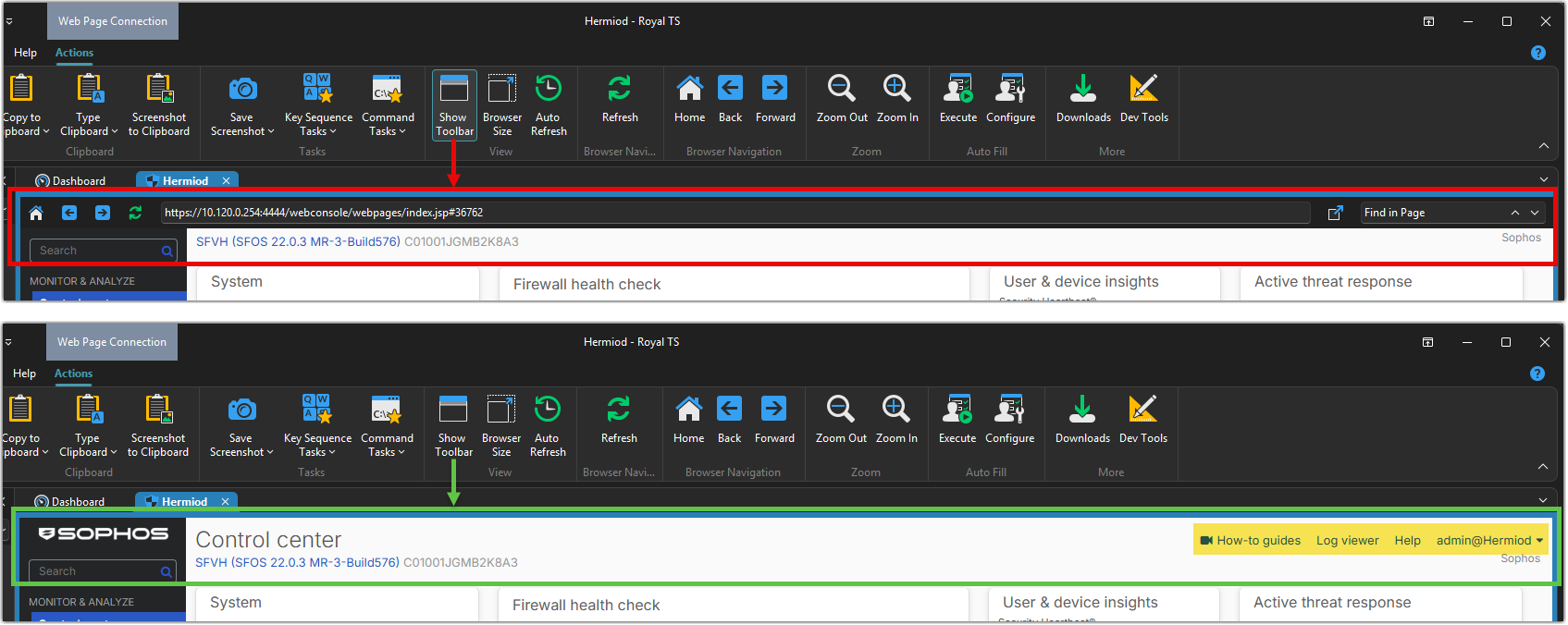
It overlap on the top of the page hiding the links at the top. You need to disable it to show the top of the page.

When I put the page in “External” mode, the toolbar is shown in the titlebar of the window and does not cause any issues:

(Btw, when switching to external, the toolbar does not always show in the titlebar until you disable and re-enable it)

Note that the issue is not present while using the Edge WebView plugin:

Best Regards,
Nicolas.

Hi Nicolas,

Thanks for the detailed report and screenshots.

I found and fixed the Chromium toolbar overlap. The fix will be included in the next beta.

I also found a startup timing issue that could overwrite toolbar visibility after switching to an external window. That has been addressed too, although I haven’t confirmed it explains every instance of the intermittent behavior you described. Please let us know if you still need to toggle the toolbar after updating.

Best regards,
Stefan