I do a lot of screwing around with microcontrollers which has me connecting random serial devices very regularly. Windows being Windows, this means I’m constantly trying to figure out which COM port was just created and then trying to create another new session with the right port/speed/etc combination to talk to it.
This get tedious pretty quickly:
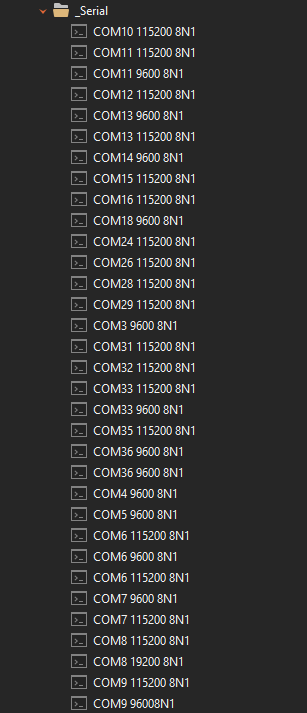
I’m looking to create a dynamic folder which will contain terminal sessions for local serial devices. I’ve knocked together this quick PowerShell script as a starting point:
$comPorts = Get-WMIObject Win32_SerialPort
$connections = @()
ForEach ($comPort in $comPorts) {
  $connection = New-Object PSCustomObject -Property @{
    "Type"                   = "TerminalConnection";
    "TerminalConnectionType" = "SerialPort";
    "Name"                   = $comPort.Caption;
    "SerialPortName"         = $comPort.DeviceID;
    "BaudRate"               = 115200;
  }
  $connections += $connection
}
@{ Objects = $connections } | ConvertTo-Json -Depth 100
“Baud” and “BaudRate” don’t appear to work. I’d like to set the speed, parity, data bits, stop bits, etc from this script.
Digging through the RoyalJSON documentation, I find no reference to how one might set the various Advanced Properties of a SerialPort object. Is that property exposed to this functionality?
If I might add a feature request to this post - it would be super helpful if an “export to JSON” option was available for existing connections. Then one could setup a connection manually, export it, and use that as a guide for scripting out dynamic connections.
