Evening,
Is there any documentation to say how to best use the “Header” type when dynamically creating Custom Properties?
I’ve already found the general reference:
RoyalJSONCustomProperty (royalapps.com)
If I define Custom Properties manualyl, they appear closely bunched in the order defined:
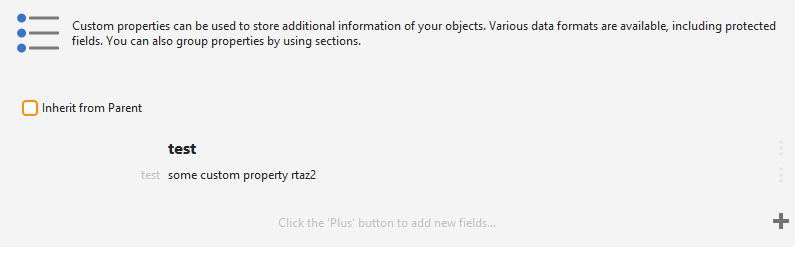
If however I try to do the same via JSON, there is a large gap between the header and the property:
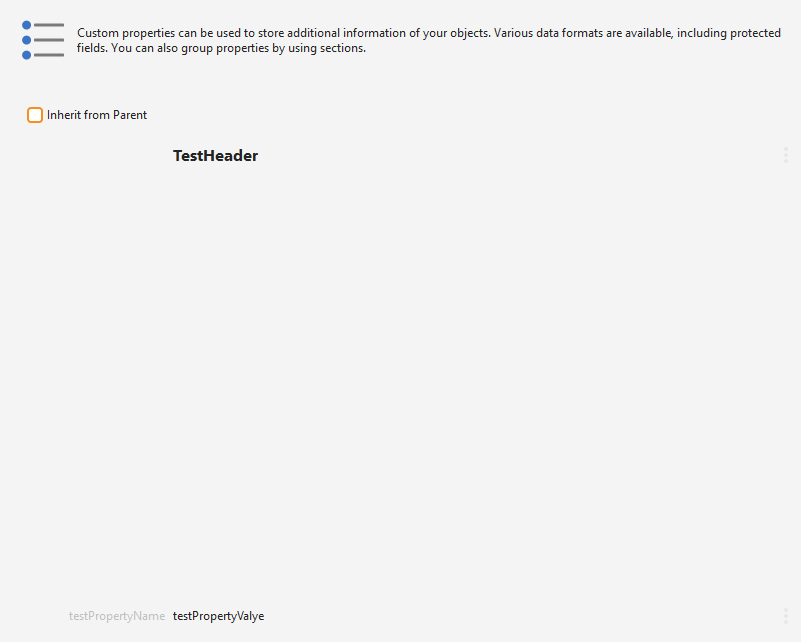
I’m looking to pull these properties in from an external system but just playing with the JSON (attached) right now until it works as expected.
Thanks for any help that can be offered.
{
  "Objects": [
    {
      "Name": "Connections",
      "Objects": [
        {
          "CustomProperties": [
            {
              "Type": "Header",
              "Name": "TestHeader",
            },
            {
              "Type": "Text",
              "Name": "testPropertyName",
              "Value": "testPropertyValye"
            }
          ],
          "TerminalConnectionType": "SSH",
          "Type": "TerminalConnection",
          "ComputerName": "192.168.1.1",
          "Notes": "Some useless note",
          "Name": "WSL - Ubuntu",
          "CustomField1": "Some Site",
          "CredentialName": "WSL - Ubuntu Login",
          "Port": "2222"
        }
      ],
      "Type": "Folder"
    }
  ]
}