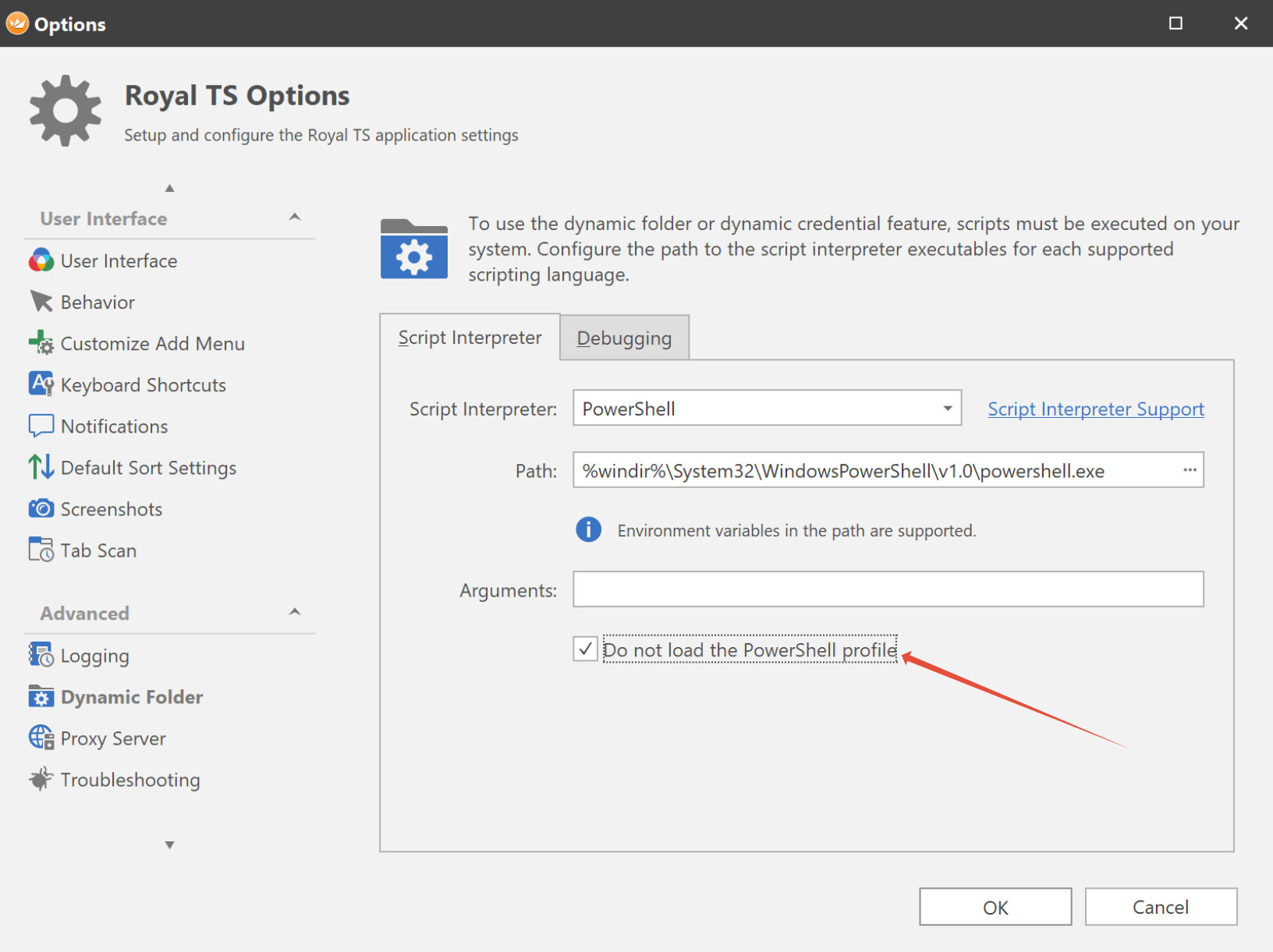
Hi,
i create a Powershell script to get computers and folders from a Sharepoint list and create a structure in RoyalTS with that information. The (shortened) PS scripts looks like:
$global:ErrorActionPreference = "Stop"
$global:WarningPreference = "SilentlyContinue"
$global:InformationPreference = "SilentlyContinue"
$global:VerbosePreference = "SilentlyContinue"
$global:DebugPreference = "SilentlyContinue"
$global:ProgressPreference = "SilentlyContinue"
$global:OutputEncoding = New-Object Text.Utf8Encoding -ArgumentList (,$false) # BOM-less
[Console]::OutputEncoding = $global:OutputEncoding
function WriteLog() {
# ... Write stuff to logfile here
}

$_site_url = "https://....sharepoint.com/teams/..."
$_client_id = "<bla-blubb-hildegard>"
$_client_secret = "<TheEvilSecret>"
$_list_identity = "<My_list_identity>" # Get the identity with Get-PnPList
$env:PNPPOWERSHELL_UPDATECHECK='false'
$env:PNPLEGACYMESSAGE='false' # Everything is tested in Powershell classic
$_pnp_powershell_version = "1.12.0"

# Install Powershell.PnP here

# Connect to sharepoint
WriteLog "Connect to sharepoint"
Connect-PnPOnline -Url $_site_url -ClientId $_client_id -ClientSecret $_client_secret -WarningAction Ignore

# Define the query Read more: https://www.sharepointdiary.com/2017/04/caml-query-to-get-list-items-from-sharepoint-using-powershell.html#ixzz7s4MpH42S
$_caml_query = "<View><Query><Where><Eq><FieldRef Name='Platform'/><Value Type='text'>gcp</Value></Eq></Where></Query></View>"

# Request items
WriteLog "Get list"
$_list = (Get-PnPList -Identity $_list_identity)
WriteLog "Get list items"
$_listItems = (Get-PnPListItem -List $_list -PageSize 2000 -Query $_caml_query)
WriteLog "Received $($_listItems.Count) items"

$_cnt = 0;
$_rootObject = New-Object -TypeName psobject
$_newFolderArray = @()

foreach ($_listItemFolder in $_listItems) {

    if (-Not ($_newFolderArray | Where-Object { $_."Name" -eq $_listItemFolder["source"]})) {
        WriteLog "Folder $($_listItemFolder["source"]) not found -> add it."
        $_newFolderObject = New-Object -TypeName psobject
        $_newFolderObject | Add-Member -MemberType NoteProperty -Name "Name" -Value $_listItemFolder["source"]
        $_newFolderObject | Add-Member -MemberType NoteProperty -Name "Type" -Value "Folder"

        $_newSessionArray = @()
        foreach ($_listItemSession in $_listItems | Where-Object { $_["source"] -eq "ztkpq6iy5dtr" }) {
            $_newSessionObject = New-Object -TypeName psobject
            $_newSessionObject  | Add-member -MemberType NoteProperty -Name ComputerName -Value $_listItemSession["IP"]
            $_newSessionObject  | Add-member -MemberType NoteProperty -Name Name -Value $_listItemSession["Hostname"]
            $_newSessionObject  | Add-member -MemberType NoteProperty -Name TerminalConnectionType -Value "SSH"
            $_newSessionObject  | Add-member -MemberType NoteProperty -Name Type -Value "TerminalConnection"
            $_newSessionArray += $_newSessionObject
        }
        $_newFolderObject | Add-member -MemberType NoteProperty -Name Objects -Value $_newSessionArray
        $_newFolderArray += $_newFolderObject

        $_cnt++
        if($_cnt -eq 3) {break;}
    }
}

WriteLog "Convert received objects into JSON format"
$_rootObject  | Add-Member -MemberType NoteProperty -Name "Objects" -Value $_newFolderArray
$_jsonObject = (ConvertTo-Json $_rootObject -Depth 100)
WriteLog $_jsonObject
Write-Host $_jsonObject
The scripts outputs a JSON file, which successful can be added to the dynamic folder and creates automatically a few folder and computers as expected. Here is the JSON (names and addresses replaced by dummy values):
{
  "Objects": [
    {
      "Name": "ztrdkbhuigtz",
      "Type": "Folder",
      "Objects": [
        {
          "ComputerName": "10.0.0.7",
          "Name": "jpioj",
          "TerminalConnectionType": "SSH",
          "Type": "TerminalConnection"
        },
        {
          "ComputerName": "10.0.0.5",
          "Name": "oijpoj",
          "TerminalConnectionType": "SSH",
          "Type": "TerminalConnection"
        },
        {
          "ComputerName": "10.0.0.6",
          "Name": "pojpoj",
          "TerminalConnectionType": "SSH",
          "Type": "TerminalConnection"
        },
        {
          "ComputerName": "172.18.74.15",
          "Name": "pjiopj",
          "TerminalConnectionType": "SSH",
          "Type": "TerminalConnection"
        },
        {
          "ComputerName": "172.18.74.13",
          "Name": "pojpoji",
          "TerminalConnectionType": "SSH",
          "Type": "TerminalConnection"
        }
      ]
    },
    {
      "Name": "opijpoji",
      "Type": "Folder",
      "Objects": [
        {
          "ComputerName": "10.0.0.7",
          "Name": "piopoij",
          "TerminalConnectionType": "SSH",
          "Type": "TerminalConnection"
        },
        {
          "ComputerName": "10.0.0.5",
          "Name": "ölkjlkjöj",
          "TerminalConnectionType": "SSH",
          "Type": "TerminalConnection"
        },
        {
          "ComputerName": "10.0.0.6",
          "Name": "iojj9nunj",
          "TerminalConnectionType": "SSH",
          "Type": "TerminalConnection"
        },
        {
          "ComputerName": "172.18.74.15",
          "Name": "öpmioiijo",
          "TerminalConnectionType": "SSH",
          "Type": "TerminalConnection"
        },
        {
          "ComputerName": "172.18.74.13",
          "Name": "oijiuhuihpiuh",
          "TerminalConnectionType": "SSH",
          "Type": "TerminalConnection"
        }
      ]
    },
    {
      "Name": "ojjpoj",
      "Type": "Folder",
      "Objects": [
        {
          "ComputerName": "10.0.0.7",
          "Name": "oöjiöjöoij",
          "TerminalConnectionType": "SSH",
          "Type": "TerminalConnection"
        },
        {
          "ComputerName": "10.0.0.5",
          "Name": "öoijöoijöojioj",
          "TerminalConnectionType": "SSH",
          "Type": "TerminalConnection"
        },
        {
          "ComputerName": "10.0.0.6",
          "Name": "ioöjöjöoijöoij",
          "TerminalConnectionType": "SSH",
          "Type": "TerminalConnection"
        },
        {
          "ComputerName": "172.18.74.15",
          "Name": "ztsreztrturdzrtd",
          "TerminalConnectionType": "SSH",
          "Type": "TerminalConnection"
        },
        {
          "ComputerName": "172.18.74.13",
          "Name": "dztrdztrdztdrtrd",
          "TerminalConnectionType": "SSH",
          "Type": "TerminalConnection"
        }
      ]
    }
  ]
}
When i run the script, i get the following error:
Unexpected character encountered while parsing value: P.Path ‘’, line 0, position 0.
Do you have any idea for me?
Regards
Dave