Is the any integration between RoyalTS and One Identity?
We utilize it in place of the RDG in RoyalTS. However, we do occasionally have random connection issues using RoyalTS, when a MSTSC connection works. wokring on moving to royalts 7 to see if that helps but would love to get some feedback
Hi!
There’s no integration out-of-the-box but we do have a feature called dynamic folder which allows users to integrate with other data sources using scripts. You can check out the repo here https://www.royalapps.com/go/dynamicfolder-samples for some samples and inspiration. Maybe someone who already created a script for this particular product is willing to share the dynamic folder in our repository. PRs are always welcome.
Regards,
Stefan
@David Macdivitt, while again, it’s not necessarily an out of the box integration, we do utilize the PowerShell capabilities/integration of both RoyalTS and Safeguard to provide some automation.
https://github.com/OneIdentity/safeguard-ps
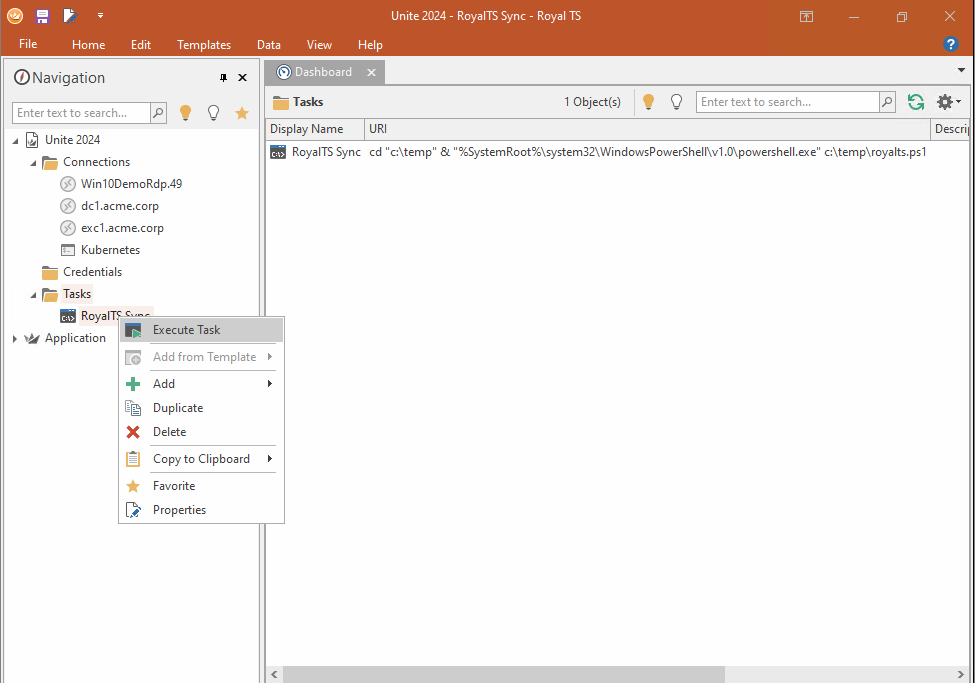
For our IT staff members that manage or need access to servers/accounts on a regular basis, we have a policy that allows them to effectively “check-out” a password from Safeguard for a day, and put it into their RoyalTS .rtsz document file (which itself should be password protected). Then, every night, Safeguard changes the passwords on the servers, and the next morning, the IT staff person will open RoyalTS, execute the script, and can use any connection as they normally would for the rest of the day.
If that policy and procedure doesn’t work for you, then perhaps you still might be able to take this idea and come up with something similar for your use case.
See the attached PowerShell file for the script and example data.
<#
    .NOTES
    ===========================================================================
     Title: Safeguard Creds to Royal TS
     Created on:   	10/7/2019
     Last Updated:	7/27/2022
     Created by:   	Eric Weintraub
     Organization: 	Quest Software
    ===========================================================================
    .DESCRIPTION
        Takes the hassle out of account checkout
#>

Clear-Host
$Error.clear()
########################################################################
#
#
#							 User Vars
#
#
########################################################################

# List of RoyalTS item display names and the associated Safeguard asset and account.
#
# This is a dictionary of key names and array list. The key name is the RoyalTS
# display name. The array list is the Safeguard asset name and account name.
# The Safeguard accounts must be available for Password requests.
#
# "RoyalTS Display Name" = @("Safeguard asset name", "Safeguard account name")

# For example:
# "Win10DemoRdp.49" = @("Win10Test", "supUser")

$AccountsToGet = @{
    "Win10DemoRdp.49" = @("Win10 Demo", "sppRdp")
    "dc1.acme.corp" = @("dc1.acme.corp", "kevinAD-admin")
    "exc1.acme.corp" = @("exc1.acme.corp", "kevinEX-admin")
    "Kubernetes" = @("uniteKube", "unitedemo")
}

# Safeguard IP
$SafeguardIPorFQDN = "kevdevspp.safeguard.tools.oneid.inc"

# Path to Royal TS File
$PathToRtszFile = join-path "C:\temp\" "Unite2024.rtsz"

# Log file Path (c:\temp\log.log if null)
$LogFilePath = "C:\temp\SafeguardRoyalTS.log"

# Location of rtscli.exe (RoyalTS Install DIR)
$RoyalTSCliPath = "C:\Program Files\Royal TS V6\rtscli.exe"

# Name of the Royal TS Document (Display Name)
$RoyalTSDocName = "Unite 2024"

$StartTime = Get-Date

########################################################################
#
#
#							Functions
#
#
########################################################################

function write-logEntry ($logSource,$logMessage,$newLine)
{
    if ($LogFilePath -eq $null)
    {
        $LogFilePath = "c:\temp\log.log"
    }

    if ($logSource.GetType().Name -eq "String")
    {
        $logSource = $logSource.ToUpper()
    }

    $FullLogString = "$(Get-Date -Format yyyy-MM-dd-HH:mm.ss.fff) | [$($logSource)] $($logMessage)"

    Write-Output $FullLogString

    if ($newLine -eq $true)
    {
        Write-Output $FullLogString | Out-File $LogFilePath
    }
    else
    {
        Write-Output $FullLogString | Out-File $LogFilePath -Append
    }
}

########################################################################
#
#
#							MAIN
#
#
########################################################################
write-logEntry -logSource "STARTING" -logMessage "-------------Starting Process---------------" -newLine $true

write-logEntry -logSource "PRE-FLIGHT" -logMessage "Checking for Safeguard Module"

$SGM = Get-Module -Name "Safeguard-PS" -ListAvailable

If (!($SGM))
{
    write-logEntry -logSource "PRE-FLIGHT" -logMessage "Safeguard Module NOT Installed... Installing"
    Install-Module safeguard-ps -Force -Scope CurrentUser
}
else
{
    write-logEntry -logSource "PRE-FLIGHT" -logMessage "Safeguard Module Installed... Testing to see if loaded"

    $SGC = Get-Command -Name "connect-safeguard"

    If (!($SGC))
    {
        write-logEntry -logSource "PRE-FLIGHT" -logMessage "Safeguard Module NOT Loaded... Loading... "
        Import-Module safeguard-ps -Force
    }
    else
    {
        write-logEntry -logSource "PRE-FLIGHT" -logMessage "Safeguard Module Loaded..."
    }
}

write-logEntry -logSource "PRE-FLIGHT" -logMessage "Loading Royal TS PowerShell Module"

if (!(Get-Module -Name "RoyalDocument.PowerShell" -ListAvailable))
{
    Install-Module -Name RoyalDocument.PowerShell -Force -Scope CurrentUser
}

if (!(Get-Module -Name "RoyalDocument.PowerShell"))
{
    Import-Module RoyalDocument.PowerShell
}

write-logEntry -logSource "PRE-FLIGHT" -logMessage "Getting Royal TS Password"

if (!($royalDocument))
{
    do
    {
        Write-Host
        $RoyalTSPwd = Read-Host -AsSecureString "Enter your RoyalTS password (Ctrl-C to exit)"

        Write-logEntry -logSource "ROYALTS" -logMessage "Loading Royal TS File"

        $royalStore = New-RoyalStore -UserName "TempUser"
        $royalDocument = Open-RoyalDocument -Store $royalStore -FileName $PathToRtszFile -Password $RoyalTSPwd

        if (!$royalDocument)
        {
            $RoyalTSPwd = $null
        }
    } while (!$royalDocument)
}

Connect-Safeguard -Insecure $SafeguardIPorFQDN -Browser

try
{
    # Check for existing Access Requests.
    $CurrentAccountRequests = Get-SafeguardAccessRequest
}
catch
{
    write-logEntry -logSource "ERROR" -logMessage "Error getting existing access requests."
}

$i = 0
foreach ($a in $AccountsToGet.GetEnumerator())
{
    $i = $i + 1
    Write-Progress -Activity "Syncing RoyalTS connections." -Status "Getting password for: $($h.Name)" -PercentComplete ((100 / $AccountsToGet.Count) * $i)

    $RequestID = $null
    $Password = $null
    $MyAccount = $null
    write-logEntry -logSource "CHECKOUT" -logMessage "Attempting to checkout: $($a.Name)"

    $existing = $CurrentAccountRequests | ? {$_.AccountName -eq $a.Value[1] -and $_.State -ne "Complete" -and $_.State -ne "PendingAcknowledgment"}

    if ($existing)
    {
        write-logEntry -logSource "CHECKOUT" -logMessage "Found existing Access Request for $($a.Name): $($existing[0].ID)"
        $RequestID = $existing[0].ID
    }
    else
    {
        write-logEntry -logSource "CHECKOUT" -logMessage "Submitting new Access Request for $($a.Name)."
        $RequestID = New-SafeguardAccessRequest -AssetToUse $a.Value[0] -AccessRequestType "Password" -AccountToUse $a.Value[1] | select -ExpandProperty id
    }

    if ($RequestID)
    {
        $Password = Get-SafeguardAccessRequestCheckoutPassword -RequestId $RequestID

        if ($Password)
        {
            $MyAccount = Get-RoyalObject -Name $a.Name -Store $royalStore

            if ($MyAccount)
            {
                write-logEntry -logSource "ROYALTS" -logMessage "Found RoyalTS Object: $($MyAccount.ListInfoPath). Setting password."
                $MyAccount | Set-RoyalObjectValue -Property CredentialPassword -Value "$($Password)" | Out-Null
            }
            else
            {
                write-logEntry -logSource "ROYALTS" -logMessage "Unable to locate RoyalTS item: $($a.Name)."
            }
        }
        else
        {
            write-logEntry -logSource "ERROR" -logMessage "Unable to get password for $($a.Name)."
        }
    }
    else
    {
        write-logEntry -logSource "ERROR" -logMessage "Was not able to get valid Access Request."
    }
}

Write-Progress -Activity "Done" -Completed

write-logEntry -logSource "ROYALTS" -logMessage "Saving RoyalTS File, don't forget to merge/reload if file is open."

Out-RoyalDocument -Document $royalDocument -FileName $PathToRtszFile
Close-RoyalDocument -Document $royalDocument

# https://support.royalapps.com/support/discussions/topics/17000021843
#Out-RoyalDocument -Document $royalDocument -Confirm:$false -FileName $PathToRtszFile | Close-RoyalDocument -Document $royalDocument -Confirm:$false | Open-RoyalDocument -FileName $royalDocument.Filename -Password $RoyalTSPwd.Password -Store $royalStore
# The single reply is to use the CLI, which is available in RoyalTS version 6.
# Shown as an example next.

$royalDocument = $null

if ($IsMacOS -eq $false)
{
    #write-logEntry -logSource "ROYALTS" -logMessage "Forcing Client to Refresh"
    #Start-Process -FilePath $RoyalTSCliPath -ArgumentList "document reload --name `"$RoyalTSDocName`"" -NoNewWindow -Wait
}

########################################################################
#
#
#							FIN
#
#
########################################################################
$EndTime = Get-Date
write-logEntry "FINISHING" "-------------Completed Process--------------"
$TotalRunTime = $EndTime - $StartTime
write-logEntry "FINISHED" "Total Time: $TotalRunTime"
Pause