After selection a connection, RoyalTS checks the reachability of the TCP port configured for this connection. This is done even without creating the actual SSH connection with the selected plugin like Rebex or Putty.
After selecting a connection a yellow dot will appear left of the connection.
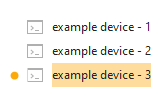
This yellow dot will change to green after the TCP port connection is successful
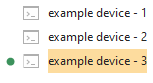
RoyalTS will do a TCP connect to the configured port each 8 seconds and this will continue until another connection is selected.
The proces starts again but then with the connection which just was selected.
Each TCP connection attempt causes the syslog message on our devices.
I want to know if it is possible if it is possible to disable this port check option but did not find a way to do so. Who has a solution for this?
Hi Nico,
you can disable the feature in View -> Options -> Behavior
Uncheck the option “Monitor state of connection…”
Let mek now if this helps.
Regards,
Stefan
Hi Stefan,
Issue solved, thanks.
I have looked at a lot of the available options but must have missed this one. After disabling the option, the port check is disabled indeed.
As this will save a lot of syslog messages I will share this info with my team members 
Thanks for your fast and useful reply.
You’re welcome. Glad I could help.
Regards,
Stefan
Hello, I’d suggest that this feature should be opt-in, because it results in a lot of log traffic, not to mention false positives in some monitored environments.
Hi Branko,
thanks for the feedback. I think you are correct and making this option an “opt-in” for the user is the better approach.
Regards,
Stefan