Hi everyone,
I’ve configured a GPO to prevent users from storing credentials in unencrypted documents. When creating a new document, an error is shown when the user try to create a new credential in it without encryption configured. That’s exactly what’s expected:
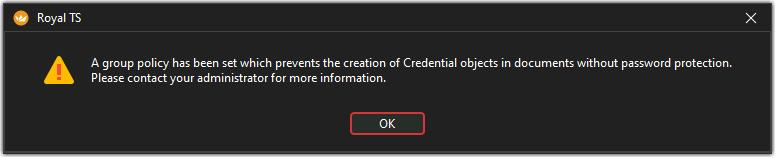
But today I’ve found out that if you open an existing unencrypted document that already contains credentials, the GPO is not enforced properly.
My use case is to deploy a personal template document with empty named credentials used in another shared document (Specify a credential name) that new users can update with their own logins & passwords and ensuring seamless usage of the shared document.
The user still get a warning message about the risk of storing credentials or sensitive data in an unencrypted document:
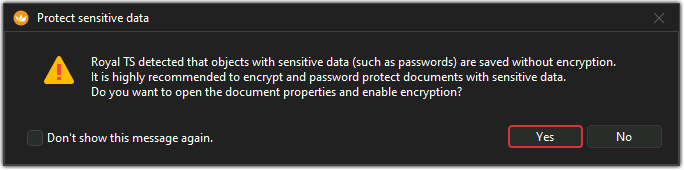
Unfortunately, if the user click on the “No” button (or Yes and cancel the document options dialog), the modifications are still applied in the document and it can be saved as-is, with clear text passwords.
It may be good to force the user to enable the encryption to be able to continue modifications on the document when the GPO is enabled.
Also opening an unencrypted document that already contains credentials (with filled passwords field, private keys or protected fields) may trigger a blocking warning forcing the encryption setup before continuing.
Of course, if this is a shared document, it may be tricky to ensure correct handling of the new encrypted format for other users who already have opened the same file (the merge may revert the encryption  ). A check before merging modifications may be needed, but handling the transition will not be as simple as expected…
Feel free to comment 
Best Regards,
Nicolas.

