Type: string, Default Value: Empty StringThe script parameters to pass on to the script.
It does not provide any sample syntax. Most of the parameters in the doco are clear, for example:
“Script” : “# powershell code…”
It is only the parameter and a value.
And I have figured out how to format extended Properties into a block.
However, the Parameters are a series of custom_parameter_name and parameter_Value grouped in the Parameters section of the Powershell-> Script block. I have tried multiple varieties of syntax of formatting but without a reference, it is impossible to script this key part of my script.
Yes, I think I may need guidance. I understand the XML code that is stored in the .rtsz file and how it related to the Parameters panel in the RoyalTS Properties screen.
I also review the link you provided in the online doco which refers to the Advanced scenarios.
Currently, i first try to create the dynamic folder with just jSON format before I create my powershell script, so I can use that to model my script output.
However, I assume I would add something like the following jSON into my connection object.
“Properties”: {
“Param1”: “$EffectiveUsername$”,
“Param2”: “Some Value”
}
But that does not seem to work.
I am assuming the result would be Param1 and Param2 being visible in the Parameters panel.
I am trying to some variations, but I feel I must be missing something in translating the custom Powershell parameters into the jSON
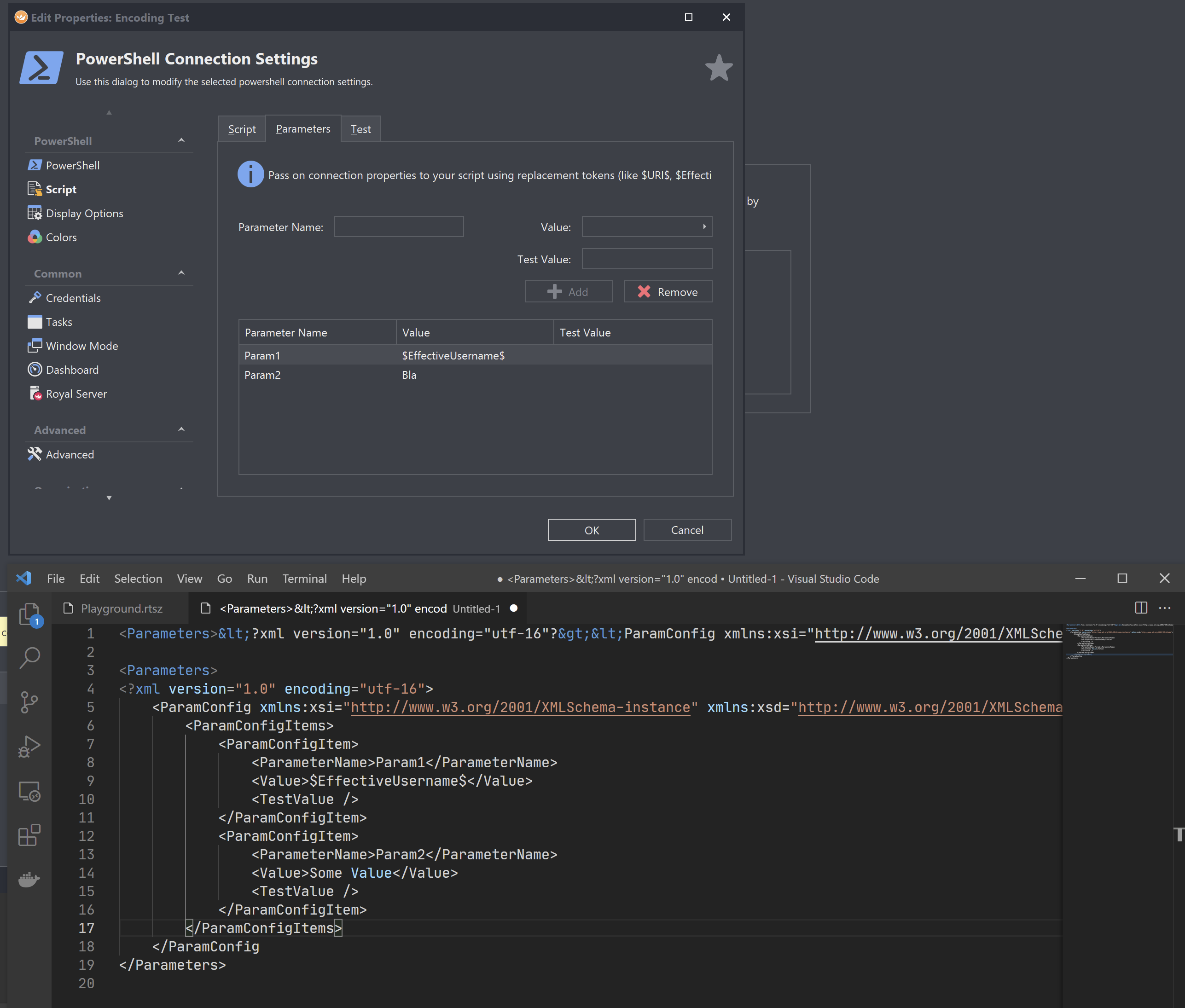
you first need to create the XML according to your requirements. Once you have that, you need to encode the XML block into a XML-encoded string (like the line 1 in the screenshot). This string must then be added to the Properties -> Parameters property in the rJson (see https://docs.royalapps.com/r2021/scripting/rjson/advanced-scenarios.html)
I’m not a PowerShell expert. I guess you can use the XML powershell cmdlets to create the parameters XML and also use a cmdlet to encode it into a string. In C# I would use the XmlTextWriter.WriteString method but there’s probably a better way to do it in PowerShell.
Let me know if this helps. I’m currently quite busy and don’t have much time to provide more details. If you need further help with that, I’m happy to dig deeper and provide a more complete sample.
Thank you for your earlier responses, but either this functionality does not work or it is not clear what the jSON syntax and object names should be are documented.
I have now given up on on this because it does not appear to actually work.
But it appears to stop short of details or even an example.
Parameters
Type: string, Default Value: Empty String
The script parameters to pass on to the script.
I have had tremendous success with creating JSON objects for credentials and connections, as well as applying Properties with additional parameters values.
However, I am now guessing at what to do after Parameters. I am able to construct a variety of JSON blocks without errors, (including your example) but no success in the resulting connection object.
As I said earlier, if this feature does work, there are no Powershell examples in the samples folders to clarify this use case.
Below is my best guess at what the Properties should look like if I was to assign multiple parameter values, but they do not result in being defined in the generated connections.
In my previous post, I showed you how to “build” the XML for each parameter. The XML must be inserted as “XML encoded string” into the json. Here’s the example I used:
Thank you for the clarification. However, I had also tried that format as well without success.
I had add backslash to escape the double quotes as well as the forward slash. Although the JSON Verify button reported success, when I reloaded and opened the generated Powershell connector object, the Script section would error with a “Royal TS has encountered a problem” Error Report.
Even through the JSON is verified, the XML still does not seem to be be interpreting the escape code as expected.
I even created a object manually, saved it and copied the XML from that directly and inserted the backslashes like your example.
And I did try you example directly assuming that it should at least result in the parameters showing up in the generated object. Which would at least have given me a working model..
Thank you for your patience. I had tried several variations. Although I was add the newline character “\n” in my original script, I was not including it in my Parameter field.
Again, thank you for the assistance, this has been a great help.