Royal TSX’s iTerm terminal plugin shows an unwanted blue triangle prompt marker at the beginning of each prompt when using zsh with Oh My Zsh.
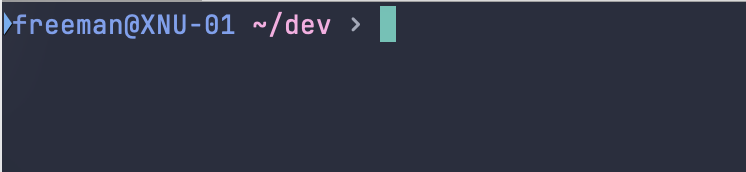
The marker appears to be triggered by Oh My Zsh’s omz_termsupport_cwd hook, which emits OSC 7 current-directory updates.
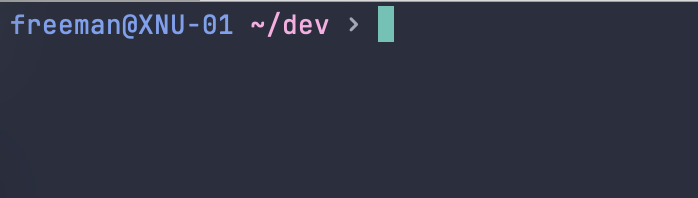
Removing only this hook fixes the issue.
Environment
- Royal TSX with iTerm terminal plugin
- macOS
- Shell:
zsh - Oh My Zsh enabled
- Prompt:
oh-my-posh
Expected Behavior
OSC 7 current-directory updates should update terminal metadata only.
They should not create or display a prompt mark indicator.
Reproduction Steps
- Open a Royal TSX terminal session using
zsh. - Make sure Oh My Zsh is loaded.
- Confirm that
omz_termsupport_cwdis active:
print -rl -- $precmd_functions
Example output includes:
omz_termsupport_cwd
- Observe the blue triangle marker at the beginning of each prompt.
- Remove only the current-directory hook:
autoload -Uz add-zsh-hook
add-zsh-hook -d precmd omz_termsupport_cwd
- Press Enter a few times.
The blue triangle marker disappears.
Temporary Fix
As a workaround, remove the Oh My Zsh current-directory terminal hook after Oh My Zsh is loaded.
In ~/.zshrc, add this immediately after:
source $ZSH/oh-my-zsh.sh
Add:
add-zsh-hook -d precmd omz_termsupport_cwd
This removes only the omz_termsupport_cwd hook. The shell prompt continues to work normally.
Note: this may disable terminal-side current-directory tracking features that depend on OSC 7.
Suspected Cause
Royal TSX’s iTerm terminal plugin may be treating OSC 7 current-directory updates as shell integration prompt marks, or otherwise enabling a visual mark indicator when this sequence is emitted by zsh/Oh My Zsh.
OSC 7 should not create a visible prompt marker by itself.