Just another feature suggestion which would increase security and
decrease the risk of getting az logins muddled up. Which would
especially be risky for MSPs like ourselves where we deal with a lot of environments at the same time and where we absolutely need the ability for multi-tenancy.
If the az
login command is preceded by setting the environmental
variable AZURE_CONFIG_DIR, the login is only saved whenever the location
that variable is used as that’s where the cli stores and retrieves the
config for the current session.
So if you set $env:AZURE_CONFIG_DIR = ‘C:\temp’, the az login in that session will be saved to C:\temp.
Would
it be possible if RoyalTS creates a folder that is unique to the
used Azure Bastion Gateway and then sets this variable before executing
the az login command that uses that Bastion? These can automatically be
cleaned up after RoyalTS is closed so no tokens and config of the used
sessions remain.
I have tried adding this as a pre-connect task but unfortunately this does not work. I think this uses a different execution session than the az connect that Royal TS does when opening up the tunnel. It would be great to be able to set a config directory for each bastion host that you configure in Royal TS. Is there any other way we could accomplish this? Right now we have to reauthenticate every time we switch environments and our engineers may be working in as many as 6-10 at a time. This is really frustrating. Thanks!
Hi, I know this hasn’t been commented for years but I’ll try anyway
I managed to get the Azure Bastion working with a separate dynamic folder which pulls objects and credentials and builds the structure (and now references the correct Azure Bastion where one exists).
The issue I have is that I have multiple Bastions across multiple Azure tenants and authentication isn’t playing nicely.
So I tried setting the ‘Azure Configuration Directory’ per Bastion which works with literal paths but not using variables such as %userprofile%. This is a problem because Royal TS is running in an RDS farm so is multi-user.
Does anyone have any ideas if this will /can work?
I just checked the code and environment variables should get expanded for the config dir. Can you check on your side again and maybe turn on debug/verbose logging and see what the logs are showing?
Hi Stefan, thanks for the reply!
More info:
I set Azure Configuration Directory to: $Env.USERPROFILE$\AzureProfiles\prod
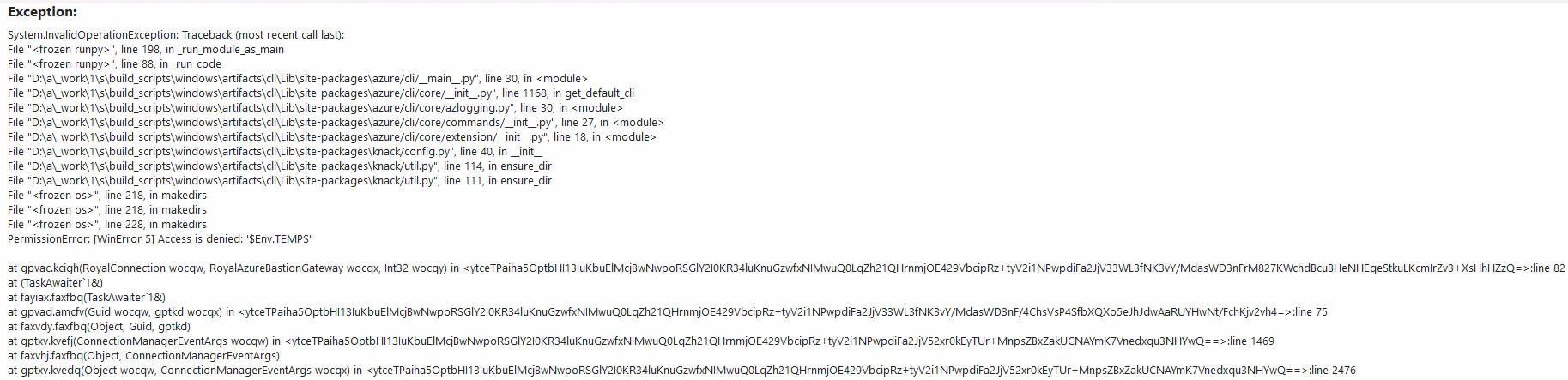
I can see the Azure CLI directory is created and populated but when I attempt to make a connection to a VM using the same Bastion, I’m prompted to authenticate to Azure and Royal TS attempts to create a tunnel but the connecton fails with **PermissionError: [WinError 5] Access is denied: ‘$Env.USERPROFILE$’.
**
I hadn’t previously found this so I wasn’t using the correct format for environment variables but I got the exact same error using **%USERPROFILE%\AzureProfiles\prod.
**
Using the TEMP variable gives me the same as well:
PermissionError: [WinError 5] Access is denied: ‘$Env.TEMP$’.
But if I remove the Azure Configuration Directory altogether, it works.
Here’s the entire error with verbose logging enabled.
Unfortunately as a new user, I cannot post more than 3 times and I am limited to 1 media item in a post so I unfrotunately can’t add all the screenshots I intended and I won’t be able to reply!
When I make a connection to a VM with bastion configured, I’m prompted to authenticate in WAM.
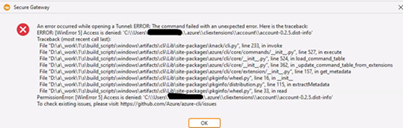
But I get the error: An error occurred while opening a Tunnel: Azure CLI Login failed.
If I clear the Azure Configuration Directory and do the same, I get prompted to authenticate but this time in the browser.
I disabled WAM by running ‘az config set core.enable_broker_on_windows=false’.
This has previously worked but now it fails with access is denied to my own profile (verbose logging enabled).
Thanks for the additional information. From your screenshots and posts I gather, the token/variable expansion seems to work fine. If I’m not mistaken, the last screenshot (resolution is quite poor) shows “Access is denied”. I can’t read much more but can you confirm that the actual path is correct in the error message?