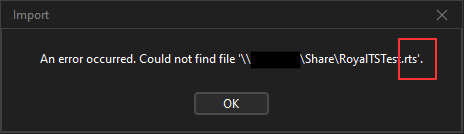
If I specify a .rtsz document in the default.settings.json in AutoStartDocumentList and set the AutoStartDocumentMode to 2, a message appears when the application starts that the document could not be found. The path in the error message contains the wrong file extension and the document is not loaded.
default.settings.json
{
    "RoyalApplicationSetting": {
        "PolicyDoNotAllowApplicationDocumentWithoutPassword": true,
        "PolicyDoNotAllowDocumentsWithoutPassword": true,
        "PolicyDoNotAllowWeakDocumentPasswords": true,
        "AutoStartDocumentMode": 2,
        "AutoStartDocumentList": "\\\\PC\\Share\\RoyalTSTest.rtsz"
    }
}
I also tried this spelling, but nothing happens when the application starts:
"AutoStartDocumentList": ["\\\\PC\\Share\\RoyalTSTest.rtsz"]
Screenhot:
Royal TS Version: 7.2.50703
Windows 10
Is this a bug or a faulty configuration?
Thanks