Hi Matt,
we’ve created a Dynamic Folder script (DynamicFolder_Topic_17000021782.rdfe), which would suit the file-format you posted in your previously reply.
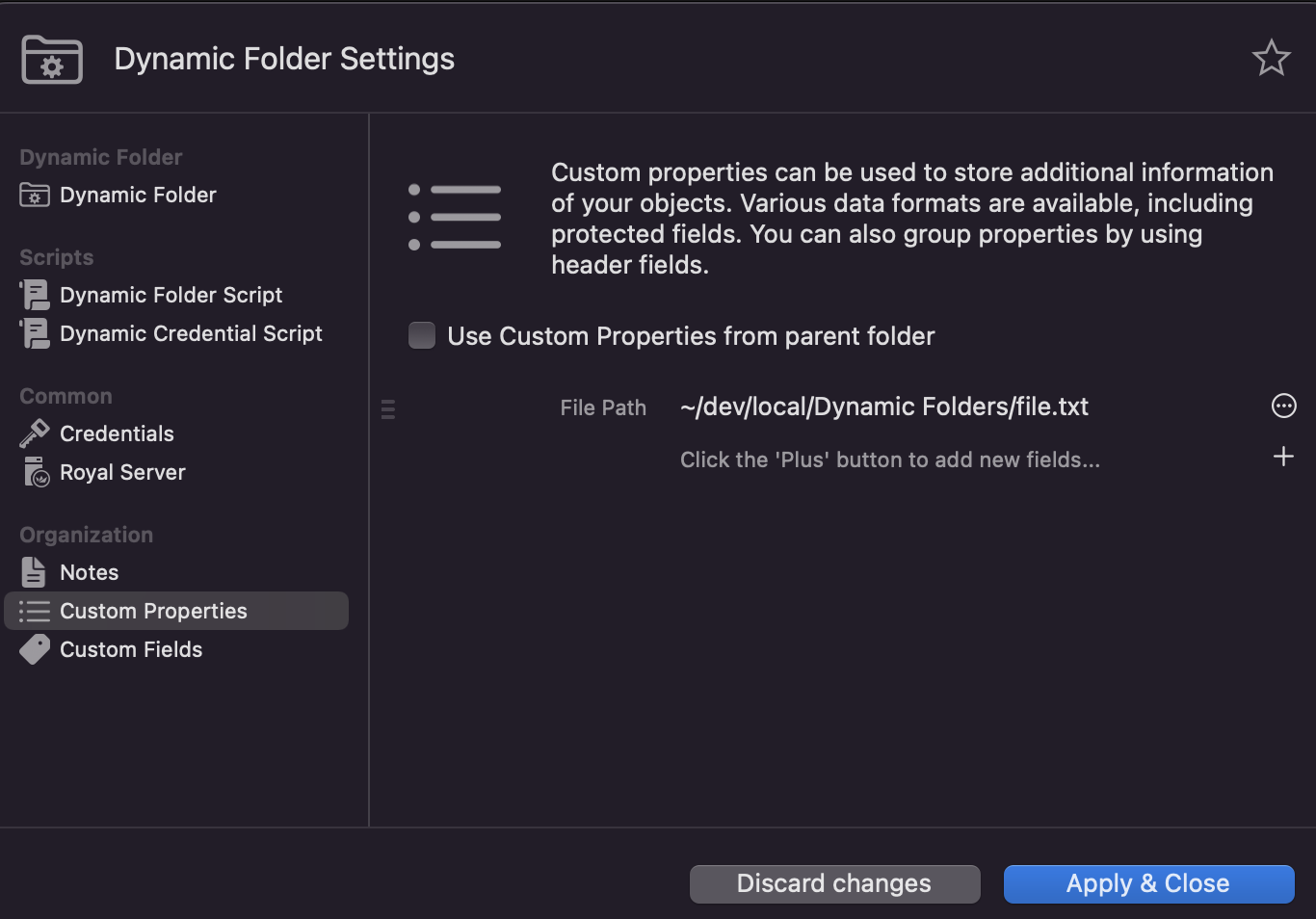
Just import the attached script via File > Import > Dynamic Folder and change the “File Path” in the “Custom Properties” section to the file you want to refer to:
Afterwards, reload the Dynamic Folder and you should see your connection structure within Royal TS/X.
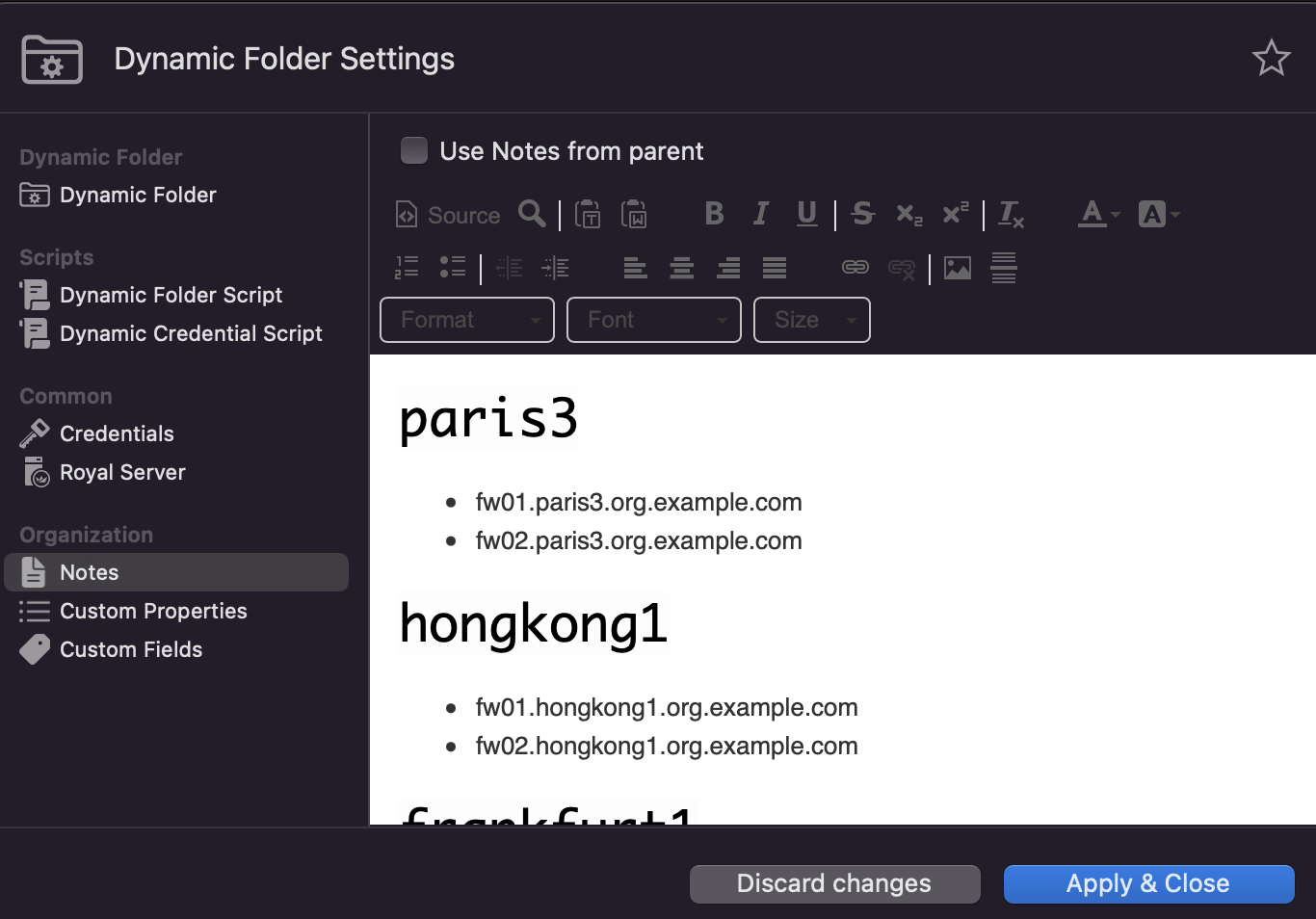
As an alternative, you can also use the ‘Python - Notes as Data Source.rdfe’ Dynamic Folder script, to import your connections via the “Notes” section of the script:
In this case, all headings elements will be created as folders, and all bullet points will be created as connections.
I hope this helps, and please let me know if you need further assistance.
Best regards,
Christoph
DynamicFolder_Topic_17000021782.rdfe:
{
  "Name": "Dynamic Folder Export",
  "Objects": [
    {
      "Type": "DynamicFolder",
      "Name": "DynamicFolder_Topic_17000021782",
      "CustomProperties": [
        {
          "Name": "File Path",
          "Type": "Text",
          "Value": "~/file.txt"
        }
      ],
      "Script": "import json\nimport os\n\n\nclass Item:\n    def __init__(self, name, is_folder):\n        self.name = name\n        self.is_folder = is_folder\n\n\ndef get_content_of_file(file_path):\n    file = open(file_path, 'r')\n    lines = file.readlines()\n    file.close()\n    return lines\n\n\ndef parse_file_content(file_content):\n    items = []\n\n    for line in file_content:\n        stripped_line = line.strip()\n\n        if not stripped_line:\n            continue\n\n        is_folder = False\n\n        if stripped_line.endswith('/'):\n            is_folder = True\n\n        stripped_line = stripped_line.replace(\"-\", \"\")\n        stripped_line = stripped_line.replace(\"/\", \"\")\n        stripped_line = stripped_line.strip()\n\n        item = Item(stripped_line, is_folder)\n        items.append(item)\n\n    return items\n\n\ndef create_rjson_model(items):\n    objects = []\n    current_folder = None\n\n    for item in items:\n        if item.is_folder:\n            current_folder = {\n                \"Type\": \"Folder\",\n                \"Name\": item.name,\n                \"Objects\": [],\n                \"CredentialsFromParent\": True\n            }\n\n            objects.append(current_folder)\n        else: # is_connection\n            connection = {\n                \"Type\": \"TerminalConnection\",\n                \"Name\": item.name,\n                \"ComputerName\": item.name,\n                \"CredentialsFromParent\": True\n            }\n\n            if current_folder:\n                current_folder[\"Objects\"].append(connection)\n            else:\n                objects.append(connection)\n\n    container = {\n        \"Objects\": objects\n    }\n\n    return container\n\n\ndef create_json_string(dict):\n    json_output = json.dumps(dict, indent=4)\n\n    return json_output\n\n\ncontent = get_content_of_file(os.path.expanduser(r\"$CustomProperty.FilePath$\"))\nitems = parse_file_content(content)\nrjson_model = create_rjson_model(items)\njson_string = create_json_string(rjson_model)\nprint(json_string)\n\n",
      "ScriptInterpreter": "python",
      "DynamicCredentialScriptInterpreter": "json",
      "DynamicCredentialScript": "{\n\t\"Username\": \"user\",\n\t\"Password\": \"pass\"\n}"
    }
  ]
}
Python - Notes as Data Source.rdfe:
{
"Name": "Dynamic Folder Export",
"Objects": [
{
"Type": "DynamicFolder",
"Name": "Python - Notes as Data Source",
"Description": "Inspired by https://community.royalapps.com/t/allow-custom-properties-in-all-fields/1612",
"Notes": "<h1><span style=\"color: rgb(0, 0, 0); font-family: Consolas, Monaco, "Andale Mono", "Ubuntu Mono", monospace; font-variant-ligatures: normal; orphans: 2; white-space: pre-wrap; widows: 2; background-color: rgb(253, 253, 253); text-decoration-thickness: initial;\">paris3</span></h1>\n\n<ul>\n\t<li>fw01.paris3.org.example.com</li>\n\t<li>fw02.paris3.org.example.com</li>\n</ul>\n\n<h1><span style=\"color: rgb(0, 0, 0); font-family: Consolas, Monaco, "Andale Mono", "Ubuntu Mono", monospace; font-variant-ligatures: normal; orphans: 2; white-space: pre-wrap; widows: 2; background-color: rgb(253, 253, 253); text-decoration-thickness: initial;\">hongkong1</span></h1>\n\n<ul>\n\t<li>fw01.hongkong1.org.example.com</li>\n\t<li>fw02.hongkong1.org.example.com</li>\n</ul>\n\n<h1><span style=\"color: rgb(0, 0, 0); font-family: Consolas, Monaco, "Andale Mono", "Ubuntu Mono", monospace; font-variant-ligatures: normal; orphans: 2; white-space: pre-wrap; widows: 2; background-color: rgb(253, 253, 253); text-decoration-thickness: initial;\">frankfurt1</span></h1>\n\n<ul>\n\t<li>fw01.frankfurt1.org.example.com</li>\n\t<li>fw02.frankfurt1.org.example.com</li>\n</ul>\n\n<h1><span style=\"color: rgb(0, 0, 0); font-family: Consolas, Monaco, "Andale Mono", "Ubuntu Mono", monospace; font-variant-ligatures: normal; orphans: 2; white-space: pre-wrap; widows: 2; background-color: rgb(253, 253, 253); text-decoration-thickness: initial;\">losangeles1</span></h1>\n\n<ul>\n\t<li><span style=\"color: rgb(0, 0, 0); font-family: Consolas, Monaco, "Andale Mono", "Ubuntu Mono", monospace; font-variant-ligatures: normal; orphans: 2; white-space: pre-wrap; widows: 2; background-color: rgb(253, 253, 253); text-decoration-thickness: initial;\">fw01.losangeles1.org.example.com</span></li>\n\t<li><span style=\"color: rgb(0, 0, 0); font-family: Consolas, Monaco, "Andale Mono", "Ubuntu Mono", monospace; font-variant-ligatures: normal; orphans: 2; white-space: pre-wrap; widows: 2; background-color: rgb(253, 253, 253); text-decoration-thickness: initial;\">fw02.losangeles1.org.example.com</span></li>\n</ul>\n",
"Script": "import json\nfrom html.parser import HTMLParser\n\nclass Item:\n\tdef __init__(self, name, is_folder):\n\t\tself.name = name\n\t\tself.is_folder = is_folder\n\n\nclass NotesHTMLParser(HTMLParser):\n\tdef __init__(self):\n\t\tsuper().__init__()\n\n\t\tself.items = []\n\t\tself.is_folder = False\n\t\tself.is_connection = False\n\n\t\tself.reset()\n\n\tdef handle_starttag(self, tag, attrs):\n\t\tif tag == \"h1\":\n\t\t\tself.is_folder = True\n\t\telif tag == \"li\":\n\t\t\tself.is_connection = True\n\t\n\tdef handle_endtag(self, tag: str) -> None:\n\t\tif tag == \"h1\":\n\t\t\tself.is_folder = False\n\t\telif tag == \"li\":\n\t\t\tself.is_connection = False\n\t\n\tdef handle_data(self, data: str) -> None:\n\t\tstripped_data = data.strip()\n\n\t\tif not stripped_data:\n\t\t\treturn None\n\n\t\tif self.is_folder or self.is_connection:\n\t\t\tself.items.append(Item(data, self.is_folder))\n\ndef parse_html_content(html_content):\n\tparser = NotesHTMLParser()\n\tparser.feed(html_content)\n\n\treturn parser.items\n\n\ndef create_rjson_model(items):\n\tobjects = []\n\tcurrent_folder = None\n\n\tfor item in items:\n\t\tif item.is_folder:\n\t\t\tcurrent_folder = {\n\t\t\t\t\"Type\": \"Folder\",\n\t\t\t\t\"Name\": item.name,\n\t\t\t\t\"CredentialsFromParent\": True,\n\t\t\t\t\"Objects\": []\n\t\t\t}\n\n\t\t\tobjects.append(current_folder)\n\t\telse: # is_connection\n\t\t\tconnection = {\n\t\t\t\t\"Type\": \"TerminalConnection\",\n\t\t\t\t\"Name\": item.name,\n\t\t\t\t\"ComputerName\": item.name,\n\t\t\t\t\"CredentialsFromParent\": True\n\t\t\t}\n\n\t\t\tif current_folder:\n\t\t\t\tcurrent_folder[\"Objects\"].append(connection)\n\t\t\telse:\n\t\t\t\tobjects.append(connection)\n\n\tcontainer = {\n\t\t\"Objects\": objects\n\t}\n\n\treturn container\n\n\ndef create_json_string(dict):\n json_output = json.dumps(dict, indent=4)\n\n return json_output\n\ncontent = r\"\"\"\n$Notes$\n\"\"\"\n\nitems = parse_html_content(content)\nrjson_model = create_rjson_model(items)\njson_string = create_json_string(rjson_model)\nprint(json_string)",
"ScriptInterpreter": "python",
"DynamicCredentialScriptInterpreter": "json"
}
]
}