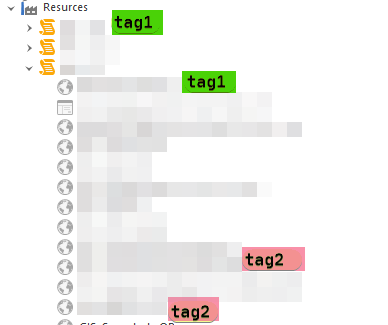
It would be nice to be able to have a tag functionality like in confluence , Wordpress etc.. where you can associate one or more tags with objects to describe attributes that can be used to quickly search for.
Although I understand there are ‘custom fields’. They don’t seem to be great for this type of task (although perfectly fine for other types of uses).
As an example.. using tags for location, or to describe hardware like GPU, or brand would make it so much easier to search for groups of objects nested in different folders and across different documents would be very very power and handy.
Also this would also be useful to create multiple flexible non hierarchical groups that don’t necessarily have any direct traditional correlation with each other except how they are grouped by tag.
As further description it would be useful to search and filter by one or more tag types but also be able to directly perform actions on the filtered tag group.
as an example
search for all objects that contain (all) tags: ssh, powershell and dell
Send a command the ssh shell for all of the objects that contain all of these tags
Use key sequence broadcaster to send to all objects that can these tags
close all sessions with all of the tags.
Some alternative flexibility could to be be able to use operator logic to determine if the tag filter uses OR or AND to filter the objects by the tags..
PLEASE add this feature. It drives me crazy that you can only search on the name of the server…so I’ve had to add “tags” to the names including things like server name and various services that they host.
Just wanted to let you know, that you can use the Description field for tags and enable the option to include the field in the search using View -> Options -> User Interface -> Navigation
Hi Stefan, were you still working on a true tag like functionality ? These workarounds do not provide any where near the level of granularity or complexity of the type of searches I want to achieve.
And it would be nice to also have a menu ribbon where you have your tags there so you can also click on the tags you want to search for and also have an option next to each tag to indicate which tag to exclude.
So if you don’t feel like typing in tags you can just mouse click them..
Thanks for the details. I now understand the use case much better.
Right now we are working on V6 with many new features (some of which may also be useful in your scenario). Since implementing such a feature requires quite some time and effort, I’m not sure we can bring it into V6 but I will write it down for a post V6 release.
Hello! Just wondering if there was any progress on this or if it was on the roadmap. Last reply was that there might not be time to get to it in V6, but we are on V7 now. Thank you!