# Support for Remote Desktop Gateway Pluggable Authentication and Authorization (PAA) Using Access Tokens
**URL:** https://community.royalapps.com/t/support-for-remote-desktop-gateway-pluggable-authentication-and-authorization-paa-using-access-tokens/2349
**Category:** Knowledge Base
**Tags:** tutorial
**Created:** [July 30, 2026, 6:07am UTC](https://community.royalapps.com/t/support-for-remote-desktop-gateway-pluggable-authentication-and-authorization-paa-using-access-tokens/2349 "2026-07-30T06:07:20Z")
**Posts on this page:** 3
**Page:** 1
### Author:  [@christoph\_muehlberger](https://community.royalapps.com/u/christoph_muehlberger)
#### Post date: [July 30, 2026, 6:07am UTC](https://community.royalapps.com/t/support-for-remote-desktop-gateway-pluggable-authentication-and-authorization-paa-using-access-tokens/2349/1 "2026-07-30T06:07:20Z")
The latest Royal TS V26 (Windows) and Royal TSX V26 (macOS) Betas introduce support for **Remote Desktop Gateway Pluggable Authentication and Authorization (PAA)** using **access tokens**.
This allows Royal TS/X to connect through Remote Desktop Gateway deployments that require an access token in addition to (or instead of) standard username/password authentication, such as secure access solutions that issue token-based credentials.
> Since PAA can be configured to work with different authentication providers, the exact configuration depends on the specific RD Gateway vendor/solution in use.
To use this functionality, at least version **26.0.8** of the **Royal TSX V26 Beta** and the latest FreeRDP plugin need to be installed.
As for **Royal TS V26 (Windows)** at least version **Beta 20** is required.
Furthermore, an RD Gateway environment configured for PAA / access token-based authentication needs to exist.
#### 1. Download the latest Royal TS/X V26 Betas from here:
[Royal TS V26 (Windows) Beta](https://www.royalapps.com/go/kb-ts-win-downloadbeta)
&
[Royal TSX V26 (macOS) Beta](https://www.royalapps.com/go/kb-ts-mac-downloadbeta)
#### 2. Update the FreeRDP Plugin to the latest version (macOS only)
#### 3. Import the .rdp File and Configure the Access Token
1. Import your `.rdp` file into Royal TS/X.
2. Open the connection’s **Properties**.
3. Navigate to the **Remote Desktop Gateway** section.
4. Enter your access token value into the new **Access Token** field.
> **Note** : The required value and format of the Access Token field depends on your RD Gateway vendor/solution. Consult your vendor’s documentation for details.
#### Example using CyberArk Infrastructure Secure Access
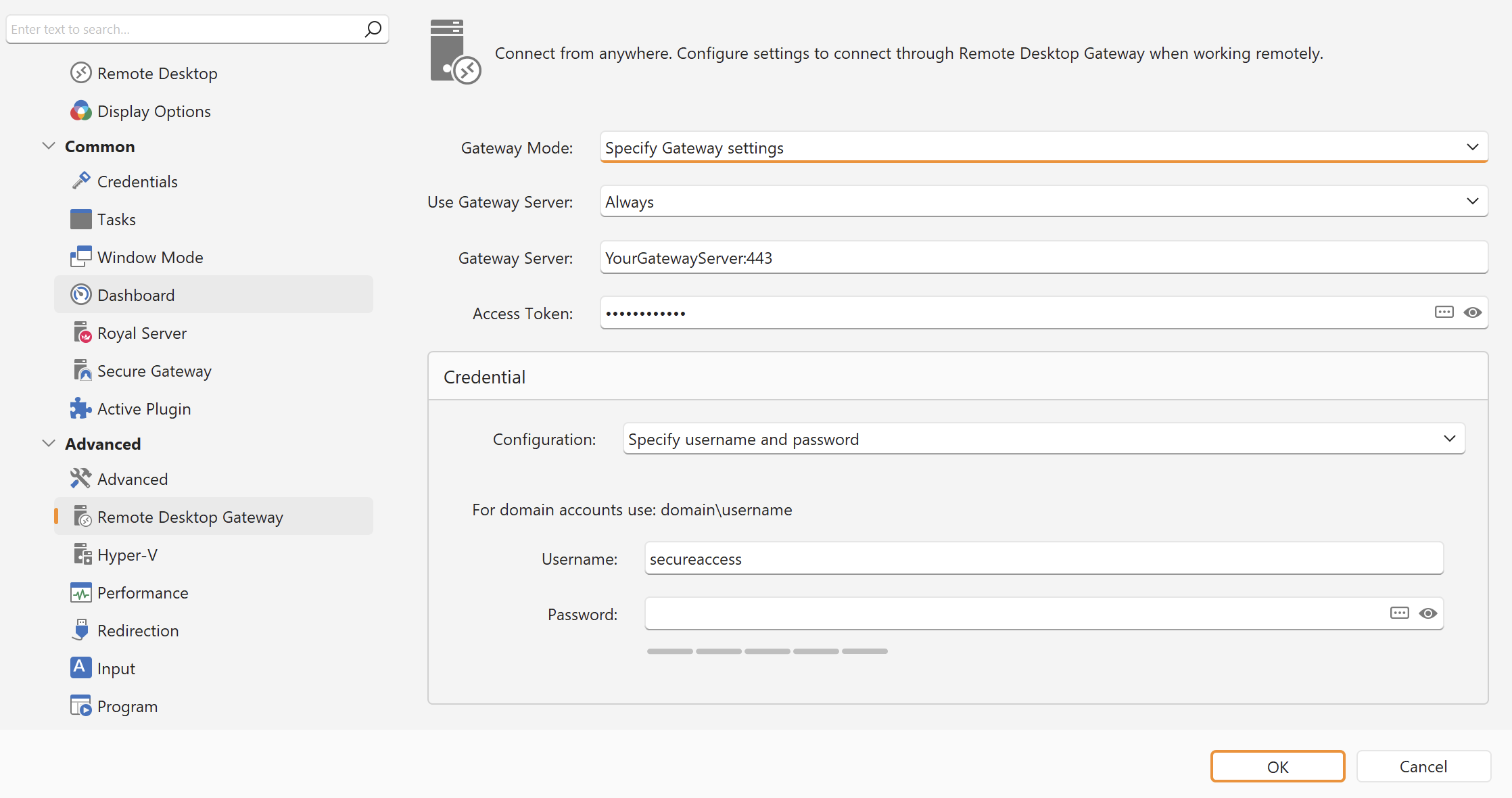
_**Royal TS V26 (Windows):**_
_**Royal TSX V26 (macOS):**_
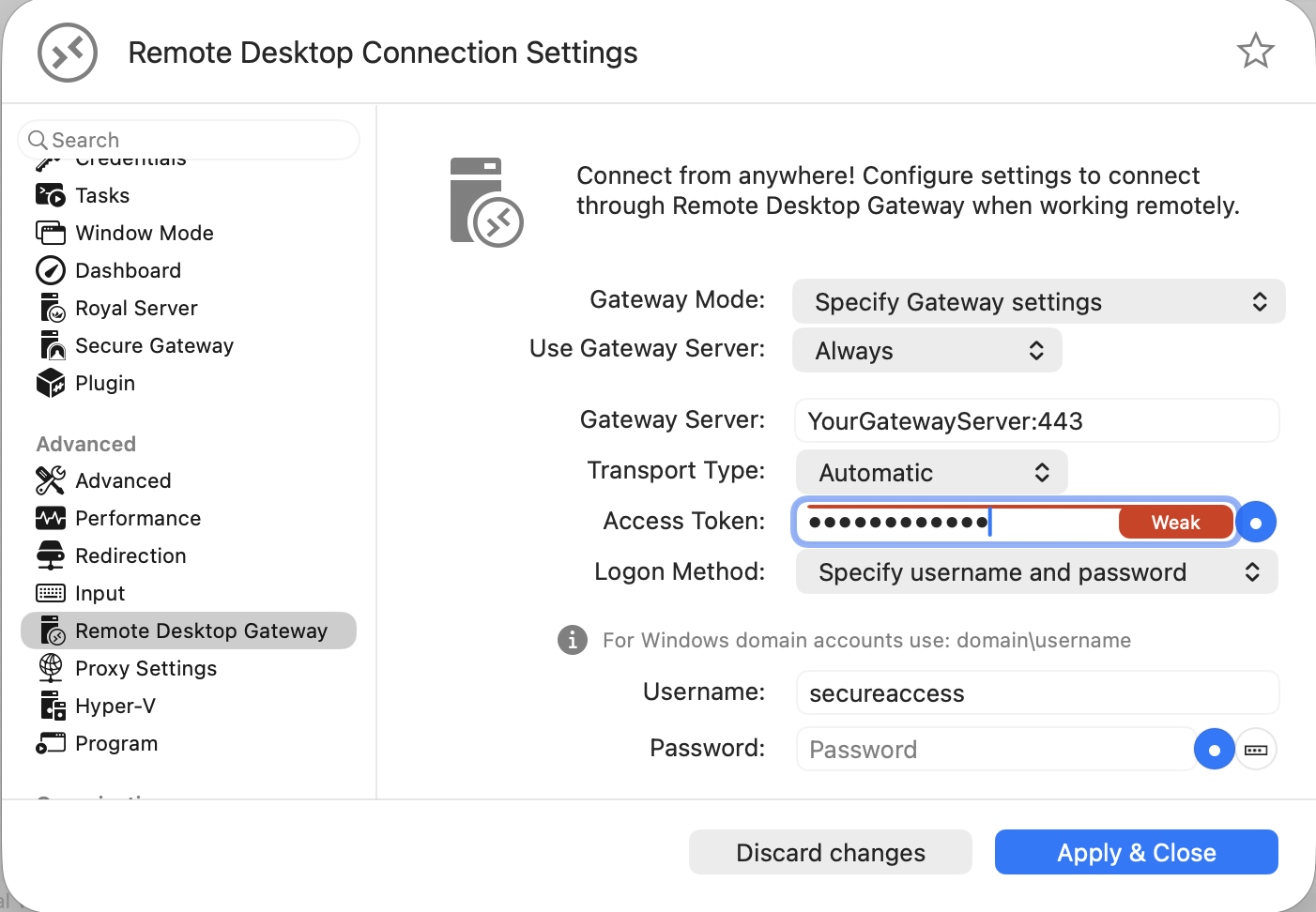
> For CyberArk’s SIA the **Access Token** and the **Username** value has to be set to `secureaccess`.
> You can find the CyberArk SIA documentation [here](https://docs.cyberark.com/access/latest/en/content/privileged-access/end-user/dpa_connect-using-rdp-login-conn-guide.htm#RemoteDesktopGateway).
Should you have any questions or need assistance, don’t hesitate to create a new support ticket [here](https://www.royalapps.com/go/support-ticket-new).
---
### Author:  [@christoph\_muehlberger](https://community.royalapps.com/u/christoph_muehlberger)
#### Post date: [July 30, 2026, 6:13am UTC](https://community.royalapps.com/t/support-for-remote-desktop-gateway-pluggable-authentication-and-authorization-paa-using-access-tokens/2349/2 "2026-07-30T06:13:53Z")
---
### Author:  [@christoph\_muehlberger](https://community.royalapps.com/u/christoph_muehlberger)
#### Post date: [July 31, 2026, 12:32pm UTC](https://community.royalapps.com/t/support-for-remote-desktop-gateway-pluggable-authentication-and-authorization-paa-using-access-tokens/2349/3 "2026-07-31T12:32:05Z")