# Shrewsoft VPN
**URL:** https://community.royalapps.com/t/shrewsoft-vpn/882
**Category:** Scripting
**Created:** [March 5, 2019, 4:58pm UTC](https://community.royalapps.com/t/shrewsoft-vpn/882 "2019-03-05T16:58:25Z")
**Posts on this page:** 4
**Page:** 1
### Author:  [@redblm](https://community.royalapps.com/u/redblm)
#### Post date: [March 5, 2019, 4:58pm UTC](https://community.royalapps.com/t/shrewsoft-vpn/882/1 "2019-03-05T16:58:25Z")
External App template:
Command: C:\Program Files\ShrewSoft\VPN Client\ipsecc.exe
Arguments: -r $CustomField1$ -u $EffectiveUsername$ -p $EffectivePassword$ -a
Working dir: “C:\Program Files\ShrewSoft\VPN Client”
Where CustomField1 is VPN Profile name in shrewsoft
Embedded in main windows would be great but it does not work in this method.
---
### Author:  [@redblm](https://community.royalapps.com/u/redblm)
#### Post date: [March 6, 2019, 9:08am UTC](https://community.royalapps.com/t/shrewsoft-vpn/882/2 "2019-03-06T09:08:38Z")
Some connection works othesr give an error after some seconds:
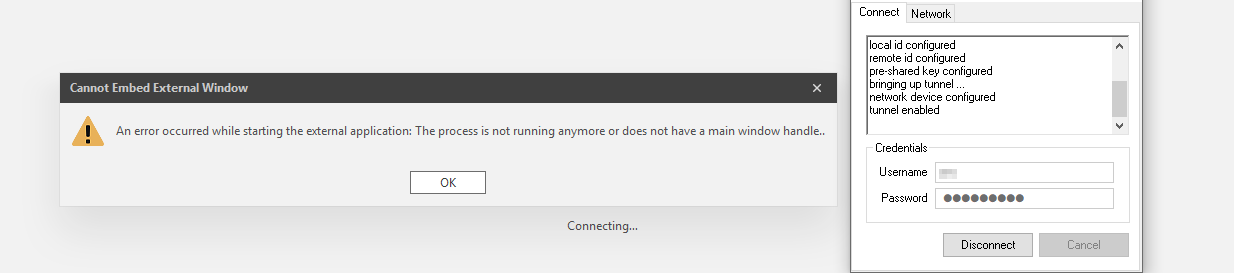
If i click ok it close the VPN Client.
Any idea?
Thank you.
---
### Author:  [@stefan\_koell](https://community.royalapps.com/u/stefan_koell)
#### Post date: [March 7, 2019, 8:48am UTC](https://community.royalapps.com/t/shrewsoft-vpn/882/3 "2019-03-07T08:48:51Z")
I see you are using external apps for your VPN client. External apps by default try to embed the main window of the process. Depending on how the VPN client is written (like starting a subsequent process), the message you see indicates that Royal TS cannot find an embeddable main window handle. It’s hard to tell why this is happening without knowing the internals of the VPN client.
In addition, most of our users are using command tasks for VPN clients. In some scenarios it can be helpful to use those tasks as connect/disconnect task in a connection to ensure the VPN is available when the connection is initiated. Command tasks also do not embed the started applications in a tab.
---
### Author:  [@redblm](https://community.royalapps.com/u/redblm)
#### Post date: [March 8, 2019, 9:02am UTC](https://community.royalapps.com/t/shrewsoft-vpn/882/4 "2019-03-08T09:02:27Z")
Thank you Stefan,
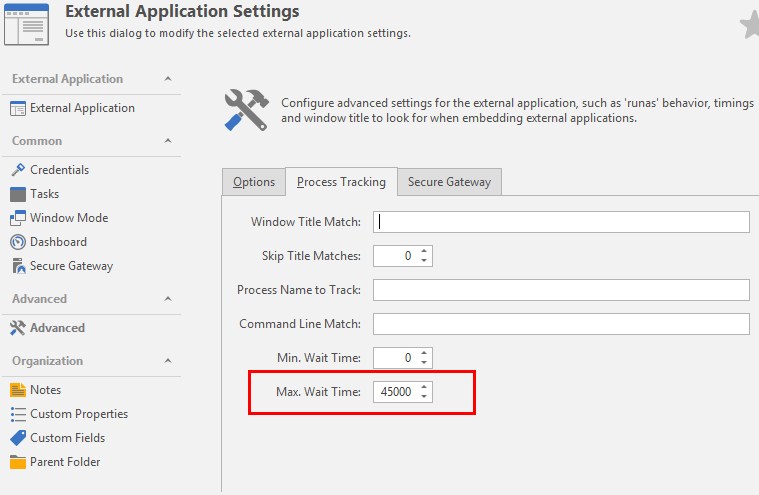
As workaround i set the “max wait time”
[](https://s3.amazonaws.com/cdn.freshdesk.com/data/helpdesk/attachments/production/17040833854/original/O_y3elMF2zXuMxucBKM_-Xt2vU-WxZG97Q.png?1552035340)