# Screen resolution on Mac (Royal TSX)
**URL:** https://community.royalapps.com/t/screen-resolution-on-mac-royal-tsx/1470
**Category:** Royal TSX (for macOS)
**Created:** [September 3, 2021, 9:51am UTC](https://community.royalapps.com/t/screen-resolution-on-mac-royal-tsx/1470 "2021-09-03T09:51:57Z")
**Posts on this page:** 6
**Page:** 1
### Author:  [@peter\_s](https://community.royalapps.com/u/peter_s)
#### Post date: [September 3, 2021, 9:51am UTC](https://community.royalapps.com/t/screen-resolution-on-mac-royal-tsx/1470/1 "2021-09-03T09:51:57Z")
Hello all,
when connection from a MacBook Pro (2560 x 1600) to a Windows Server using Royal TSX, the screen resolution is pretty low (1440x875) so that the image is quite blurry.
Is there a way to adjust the resolution in Royal TSX? (I only found guides for Royal TS for Windows).
Kind regards
---
### Author:  [@christoph\_muehlberger](https://community.royalapps.com/u/christoph_muehlberger)
#### Post date: [September 3, 2021, 10:15am UTC](https://community.royalapps.com/t/screen-resolution-on-mac-royal-tsx/1470/2 "2021-09-03T10:15:47Z")
Hi Peter,
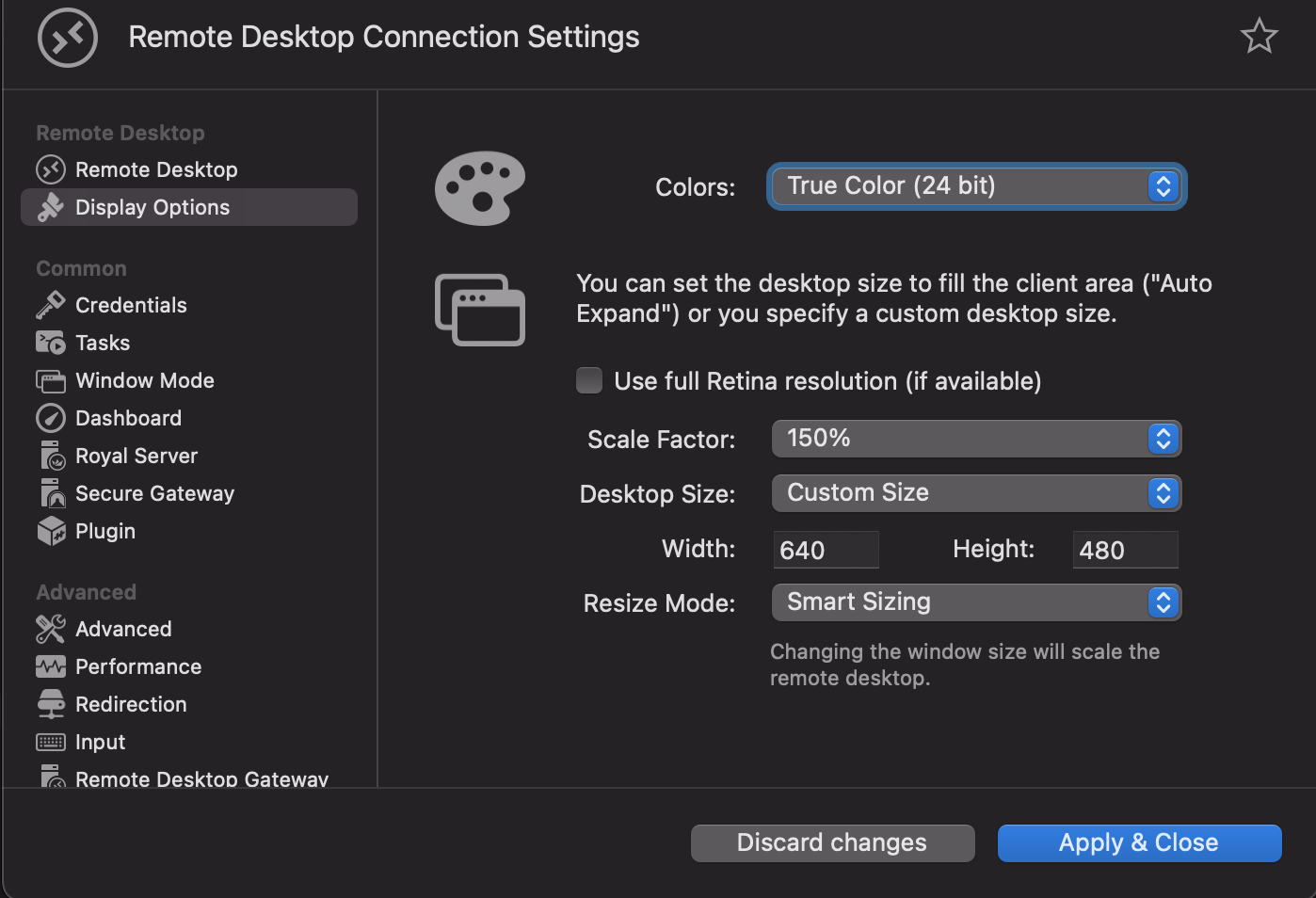
within the Remote Desktop Connection Settings, when you click on ‘Display Options’ and deselect ‘Use full Retina resolution’, you are able to set your own custom size as well as a ‘Resize Mode’.
Maybe try playing around with these settings to see if this fixes your problem.
best regards,
Christoph
---
### Author:  [@peter\_s](https://community.royalapps.com/u/peter_s)
#### Post date: [September 9, 2021, 8:40am UTC](https://community.royalapps.com/t/screen-resolution-on-mac-royal-tsx/1470/3 "2021-09-09T08:40:10Z")
Ah, so it’s per connection and not system-wide. That explains why I couldn’t find it - thank you very much Christoph, I can work with that!
---
### Author:  [@christoph\_muehlberger](https://community.royalapps.com/u/christoph_muehlberger)
#### Post date: [September 9, 2021, 9:28am UTC](https://community.royalapps.com/t/screen-resolution-on-mac-royal-tsx/1470/4 "2021-09-09T09:28:46Z")
Hi Peter,
glad this worked for you.
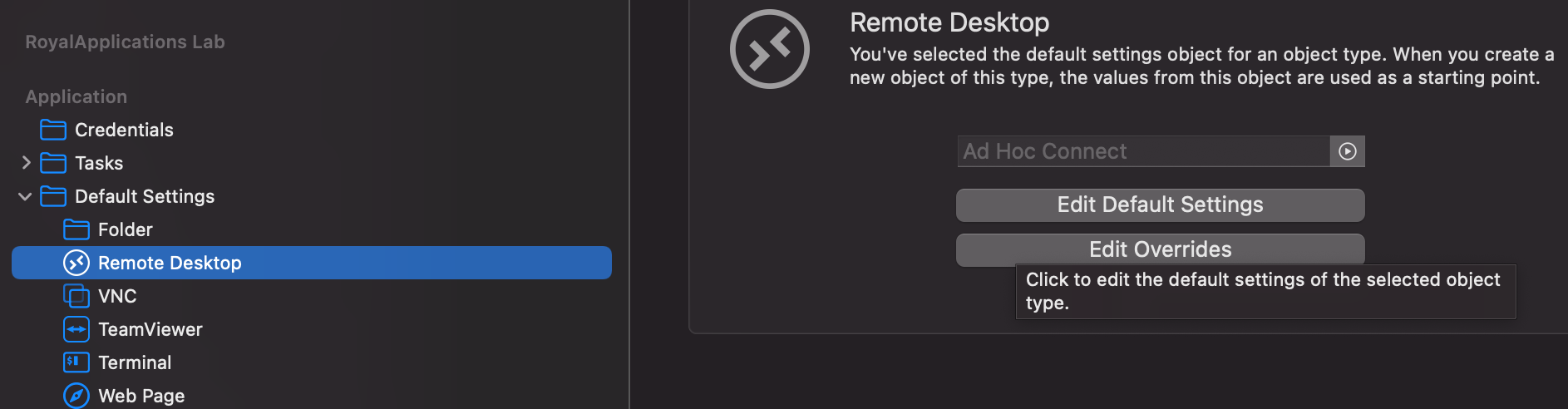
If you want to edit the (system-wide) Default Settings, you can do so by switching to the ‘Application’ document, expanding ‘Default Settings’ and then selecting ‘Remote Desktop’
From there on, you are able to Edit the Default Settings.
best regards,
Chrtistoph
---
### Author:  [@peter\_s](https://community.royalapps.com/u/peter_s)
#### Post date: [October 12, 2021, 1:09pm UTC](https://community.royalapps.com/t/screen-resolution-on-mac-royal-tsx/1470/5 "2021-10-12T13:09:36Z")
Perfect, thanks a lot!
---
### Author:  [@christoph\_muehlberger](https://community.royalapps.com/u/christoph_muehlberger)
#### Post date: [October 13, 2021, 7:17am UTC](https://community.royalapps.com/t/screen-resolution-on-mac-royal-tsx/1470/6 "2021-10-13T07:17:50Z")
You’re welcome, let me know if you need anything else!
best regards,
Christoph