# Hidden Directories using SFTP with version 4.0
**URL:** https://community.royalapps.com/t/hidden-directories-using-sftp-with-version-4-0/317
**Category:** Royal TS (for Windows)
**Created:** [December 22, 2016, 7:27pm UTC](https://community.royalapps.com/t/hidden-directories-using-sftp-with-version-4-0/317 "2016-12-22T19:27:35Z")
**Posts on this page:** 10
**Page:** 1
### Author:  [@jason\_spatz](https://community.royalapps.com/u/jason_spatz)
#### Post date: [December 22, 2016, 7:27pm UTC](https://community.royalapps.com/t/hidden-directories-using-sftp-with-version-4-0/317/1 "2016-12-22T19:27:35Z")
You can’t type them in! If I am connected to a linux/unix box and I go to
/home/oracle
no problem
if I type in
/home/oracle/.ssh as soon as I type the . I get
An error occurred while executing the action ‘Change Directory’. No such file; No such directory. Do you want to reconnect?
However if I cut and past from the clipboard the full directory with the .ssh I can then browse to that directory.
So manually typing the . in the address bar doesn’t work right!
---
### Author:  [@stefan\_koell](https://community.royalapps.com/u/stefan_koell)
#### Post date: [December 23, 2016, 3:51pm UTC](https://community.royalapps.com/t/hidden-directories-using-sftp-with-version-4-0/317/2 "2016-12-23T15:51:30Z")
Hi Jason!
Thanks for reporting this bug. The next release will have that fixed.
Regards,
Stefan
---
### Author:  [@jo\_o4](https://community.royalapps.com/u/jo_o4)
#### Post date: [February 15, 2017, 8:28pm UTC](https://community.royalapps.com/t/hidden-directories-using-sftp-with-version-4-0/317/3 "2017-02-15T20:28:40Z")
Hi Stephan,
Any updates on an eta for this ,
We ran into this independently today and it was a bit of a pain for a moment!
Regards,
Jo
---
### Author:  [@stefan\_koell](https://community.royalapps.com/u/stefan_koell)
#### Post date: [February 16, 2017, 7:02am UTC](https://community.royalapps.com/t/hidden-directories-using-sftp-with-version-4-0/317/4 "2017-02-16T07:02:47Z")
Hi Jo,
can you check the latest beta version:
> [@Royal TS Previous Versions](https://community.royalapps.com/t/royal-ts-previous-versions/232):
>
> Royal TS V7: Royal TS V6 or earlier:
This release should have this fixed.
Regards,
Stefan
---
### Author:  [@jo\_o4](https://community.royalapps.com/u/jo_o4)
#### Post date: [February 16, 2017, 9:51am UTC](https://community.royalapps.com/t/hidden-directories-using-sftp-with-version-4-0/317/5 "2017-02-16T09:51:01Z")
Hi Stefan,
The Beta fixes the problem of disconnecting and the error messages, although I still can’t access a hidden directory (starting with a .) by typing it into the path bar at the top, is there a way of looking at hidden folders that I’m missing?
Thanks for your help,
Jo
---
### Author:  [@stefan\_koell](https://community.royalapps.com/u/stefan_koell)
#### Post date: [February 16, 2017, 9:56am UTC](https://community.royalapps.com/t/hidden-directories-using-sftp-with-version-4-0/317/6 "2017-02-16T09:56:15Z")
Did you enable “Show hidden files” in Advanced:
[https://content.royalapplications.com/Help/RoyalTS/V4/index.html?reference\_filetransfer\_advanced.htm](https://content.royalapplications.com/Help/RoyalTS/V4/index.html?reference_filetransfer_advanced.htm)
---
### Author:  [@jo\_o4](https://community.royalapps.com/u/jo_o4)
#### Post date: [February 16, 2017, 9:59am UTC](https://community.royalapps.com/t/hidden-directories-using-sftp-with-version-4-0/317/7 "2017-02-16T09:59:02Z")
I didn’t - Thanks sorted it.
Thanks again for your amazingly prompt support,
Regards,
Jo
---
### Author:  [@stefan\_koell](https://community.royalapps.com/u/stefan_koell)
#### Post date: [February 16, 2017, 10:01am UTC](https://community.royalapps.com/t/hidden-directories-using-sftp-with-version-4-0/317/8 "2017-02-16T10:01:58Z")
You’re welcome! Glad that helped!
---
### Author:  [@mark\_n](https://community.royalapps.com/u/mark_n)
#### Post date: [July 24, 2024, 9:13pm UTC](https://community.royalapps.com/t/hidden-directories-using-sftp-with-version-4-0/317/9 "2024-07-24T21:13:25Z")
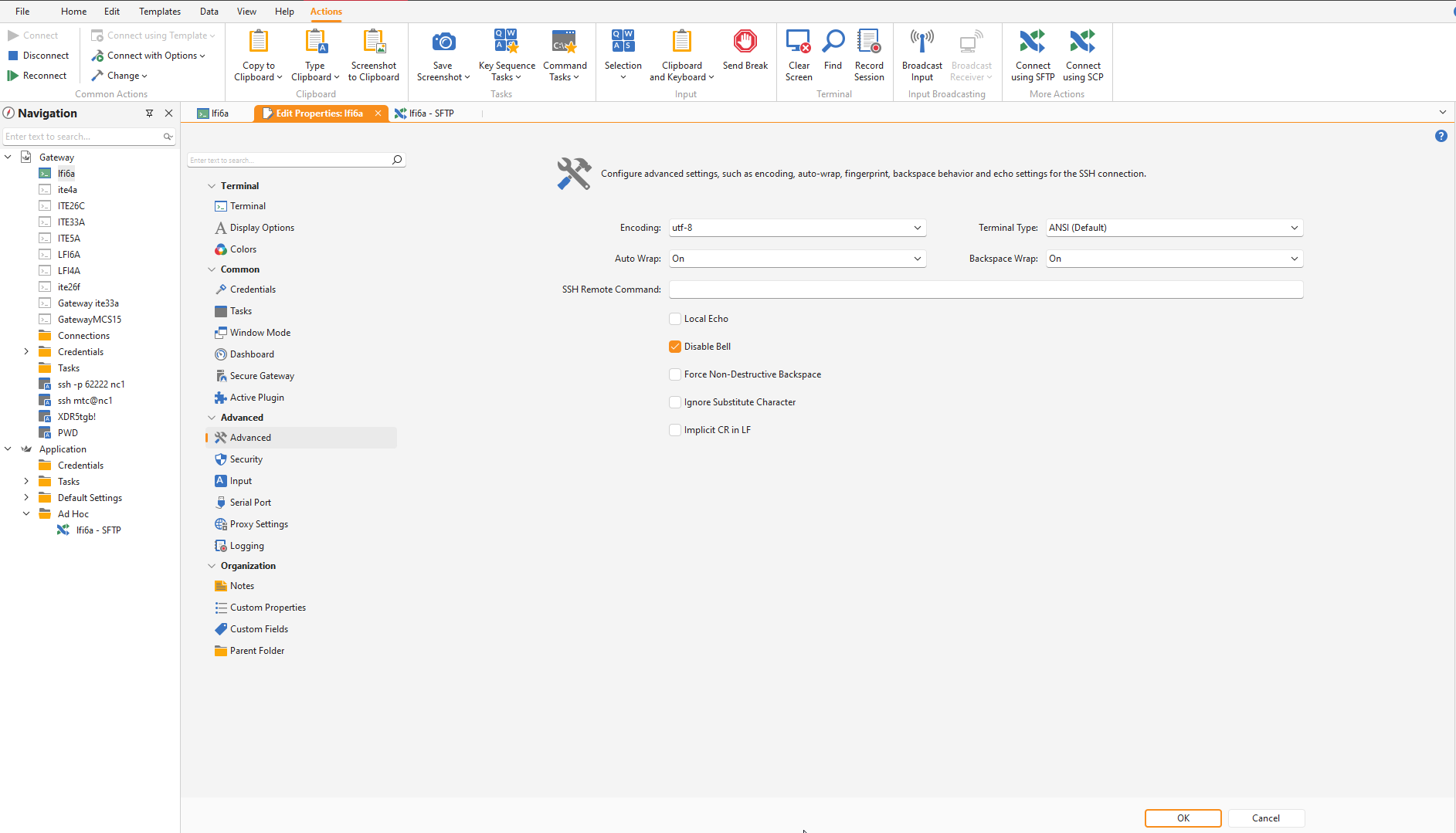
Hi, I have Royal TS version 7 but I don’t see the option “Show hidden files” in Advanced.
---
### Author:  [@christoph\_muehlberger](https://community.royalapps.com/u/christoph_muehlberger)
#### Post date: [July 25, 2024, 7:05am UTC](https://community.royalapps.com/t/hidden-directories-using-sftp-with-version-4-0/317/10 "2024-07-25T07:05:24Z")
Hi Mark,
I’ve just replied to your ticket earlier but will paste the answer here as well:
for Terminal connections, you can view hidden files with the command “ls -a” for instance:
[https://askubuntu.com/questions/232649/how-to-show-or-hide-a-hidden-file](https://askubuntu.com/questions/232649/how-to-show-or-hide-a-hidden-file)
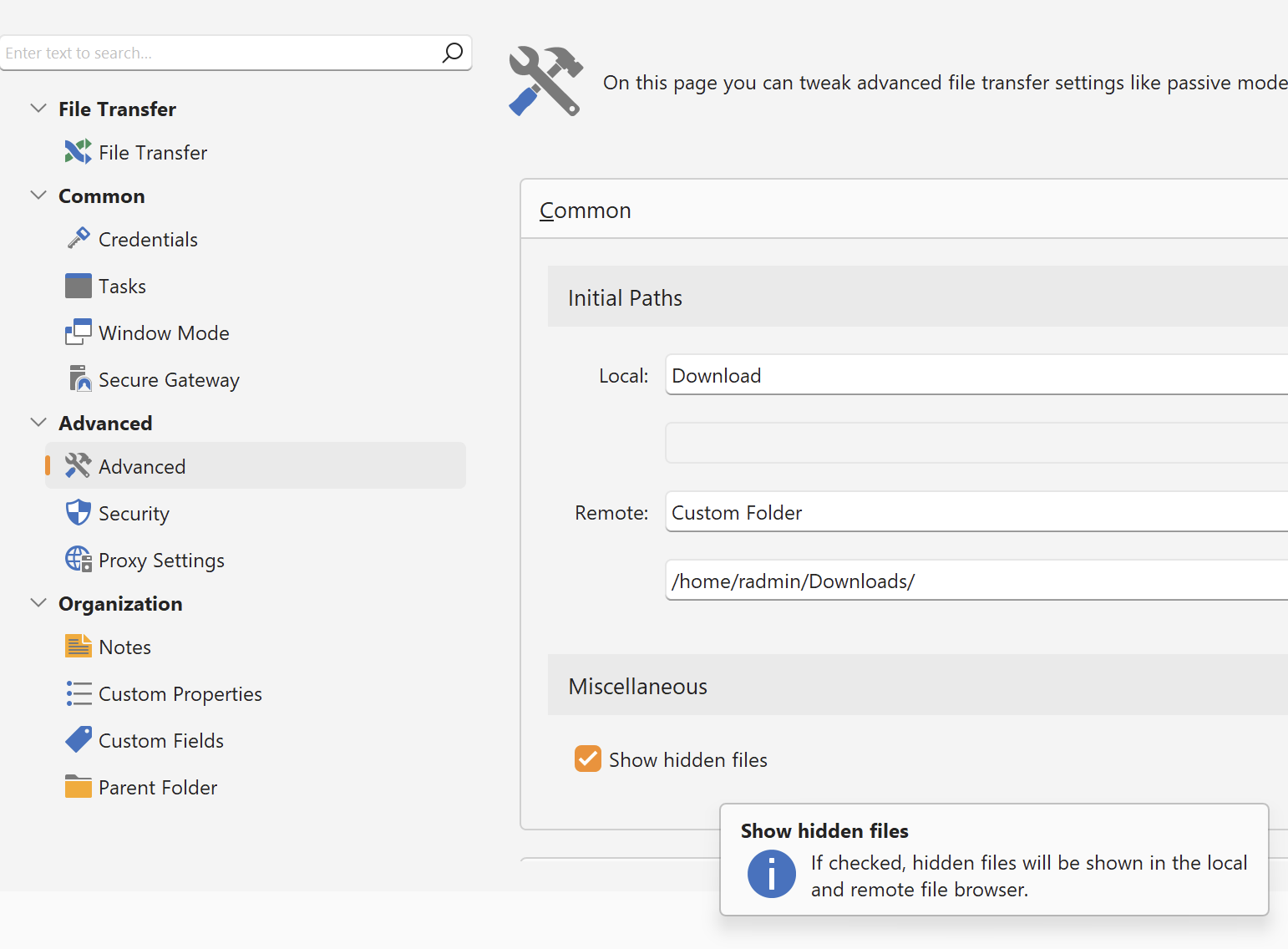
For File Transfer connections, the option can be found in the “Advanced \> Miscellaneous” section as shown here:
I hope this helps!
Best regards,
Christoph