Hi everyone,
I have encountered an issue when using RoyalTerminal/GhostTTY: using an explicit font style, instead of specifying just the font family, causes the session to revert to a default font.
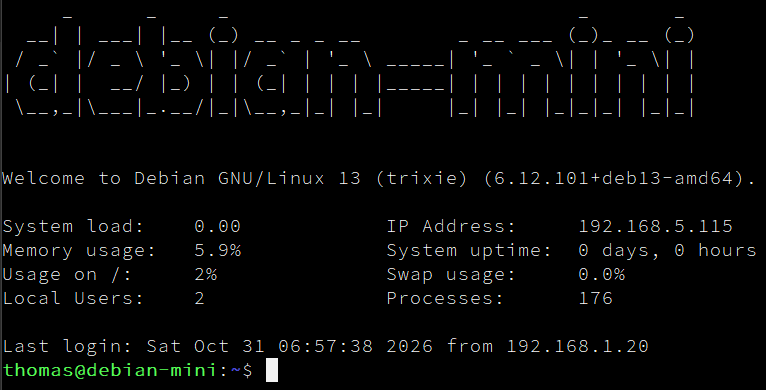
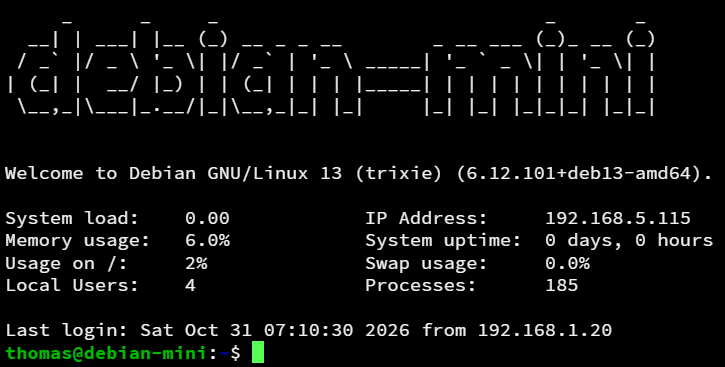
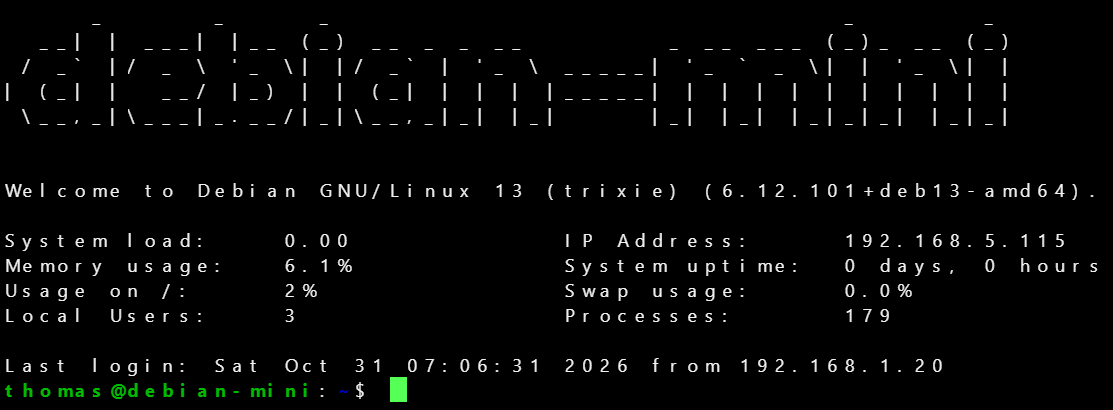
Attached are three pictures:
1. Rebex with “Source Code Pro Light” (reference)
2. RoyalTerminal with “Source Code Pro”
3. RoyalTerminal with “Source Code Pro Light” (not really, its bugged)
This issue appears not just with the Source Code Pro Font, I could also reproduce it with Cascadia Mono and Cascadia Code. The other fonts on my system are not monospace, so its not easily comparable. I have tested with 26 Beta 25, but it exists for at least a few builds.
Best Regards,
Thomas
Hi Thomas,
Thanks for the report and comparison screenshots. We reproduced the issue with Source Code Pro Light and the Cascadia fonts.
Windows exposes names such as “Source Code Pro Light,” while RoyalTerminal’s renderer groups the font under “Source Code Pro” with a separate “Light” style. That mismatch caused it to select a default font.
We’ve implemented a fix for the font-name resolution and unified the font picker across Rebex, RoyalTerminal, and PuTTY. Unavailable fonts now use a monospace fallback. Your saved font settings will continue to work without changes.
The fix is prepared for an upcoming Royal TS 26 beta. Please let us know whether it resolves the issue with your fonts once that build is available.
Best regards,
Stefan