# Allow Custom Symbol Sets for Password Generation
**URL:** https://community.royalapps.com/t/allow-custom-symbol-sets-for-password-generation/2402
**Category:** Royal TS (for Windows)
**Created:** [October 2, 2026, 9:43pm UTC](https://community.royalapps.com/t/allow-custom-symbol-sets-for-password-generation/2402 "2026-10-02T21:43:13Z")
**Posts on this page:** 4
**Page:** 1
### Author:  [@Logharn](https://community.royalapps.com/u/Logharn)
#### Post date: [October 2, 2026, 9:43pm UTC](https://community.royalapps.com/t/allow-custom-symbol-sets-for-password-generation/2402/1 "2026-10-02T21:43:13Z")
Hello,
I would like to suggest an enhancement to the password generator used when creating or editing credentials.
At the moment, Royal TS provides several useful options such as password length, use of symbols… However, when the “Use Symbols” option is enabled, the generator can produce any available symbol.
In some situations this can be inconvenient because certain symbols are difficult to type on specific keyboard layouts. For example, on a keyboard layout, characters such as {, }, [,], |, and others are not as easily accessible as symbols like !, #, %, &, +, or -.
Would it be possible to add support for custom symbol sets for password generation?
Ideally, this could be configurable globally and optionally overridden at the document level. When a document-specific symbol set is defined, it could take precedence over the global configuration.
For example:
Allowed symbols: !#$%&+\_-=
The password generator would then only pick symbols from that user-defined list.
This would make generated passwords easier to type on specific keyboard layouts while still maintaining strong password complexity requirements.
It could also help users comply with password policies that restrict or prohibit certain special characters.
Thanks!
---
### Author:  [@stefan\_koell](https://community.royalapps.com/u/stefan_koell)
#### Post date: [October 7, 2026, 7:38pm UTC](https://community.royalapps.com/t/allow-custom-symbol-sets-for-password-generation/2402/2 "2026-10-07T19:38:29Z")
Thanks for the feedback! I will see what I can do. The next beta will offer some options, including a custom allowed symbols list.
---
### Author:  [@stefan\_koell](https://community.royalapps.com/u/stefan_koell)
#### Post date: [October 9, 2026, 7:28am UTC](https://community.royalapps.com/t/allow-custom-symbol-sets-for-password-generation/2402/3 "2026-10-09T07:28:29Z")
Here’s a screenshot of the new options (under **User Interface** → **Password Generator** ):
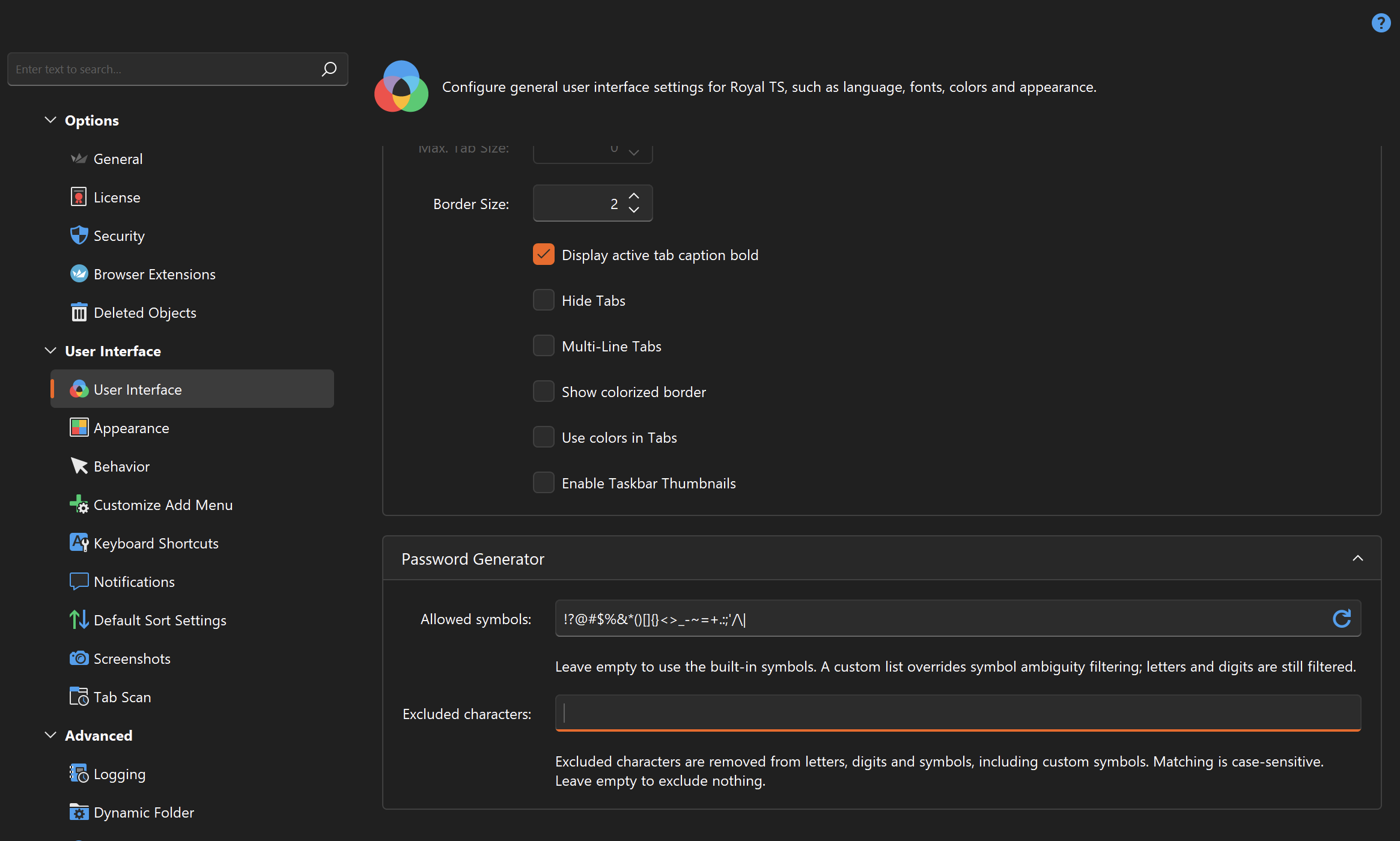
Next V26 beta will have this on board.
---
### Author:  [@Logharn](https://community.royalapps.com/u/Logharn)
#### Post date: [October 9, 2026, 7:58am UTC](https://community.royalapps.com/t/allow-custom-symbol-sets-for-password-generation/2402/4 "2026-10-09T07:58:26Z")
Hi,
Wow, that was fast! 😊
Thank you for implementing the suggestion.
Looking forward to trying it out in the next beta release.
Thanks again for the quick turnaround and for considering the feedback!